Practical C# Code Management Examples
This guide provides practical examples for common code management scenarios in Intent Architect. Each example demonstrates how to handle real-world situations where you need to customize or extend generated code.
For a comprehensive explanation of code management concepts, see the C# Code Management documentation.
Code Management Modes
Intent Architect creates and maintains large portions of your codebase through continuous code generation. When you need to customize the generated code, you can use Code Management Instructions to control how Intent Architect handles specific sections of this code. This is achieved by adjusting the Mode for a section of code:
- Fully Mode: Intent Architect owns, governs and controls the generated code completely.
- Ignore Mode: The developer owns and controls the code completely. Intent Architect will not touch this code.
- Merge Mode: The Intent Architect generated code is intelligently merged with developer added code.
When to use Code Management
The various code management techniques described below can be leveraged when:
- You want to put an exception or small tweak into the pattern output by Intent Architect.
- You want to extend the code which Intent Architect is generating.
- You want to completely customize the code Intent Architect is generating, either in an isolated fashion, or by opening the code up for broader changes.
The techniques can be applied in a number of ways depending on what you want to do and the intention you want to convey with the code management applied.
Choosing the Right Code Management Technique
Intent Architect provides multiple code management techniques: [IntentIgnore], [IntentManaged(Mode.Ignore)], // IntentIgnore (along with other variants). The choice depends on where you're applying the instruction:
Attribute-based technique (e.g.,
[IntentIgnore]or[IntentManaged(Mode.Ignore)]) - This should be the default technique and used most of the time (such as above classes, methods, properties, or any other C# element that supports attributes).Comment-based techniques (e.g.,
// IntentIgnore) - This should only be used when a C# attribute is not supported (such as inside method bodies or above individual lines of code).
Note
Each file generated by Intent Architect will also have a [DefaultIntentManaged] attribute defined at the top of the file. This indicates the default instruction for the entire file and can be overridden at lower levels - either by modifying the existing code management attribute on the relevant code block (class, method, etc.) if present, or by adding it if not present.
Practical Examples
Intent Architect wants to remove my method
Scenario: You've manually added a method to a class, but Intent Architect wants to remove it during the Software Factory execution.
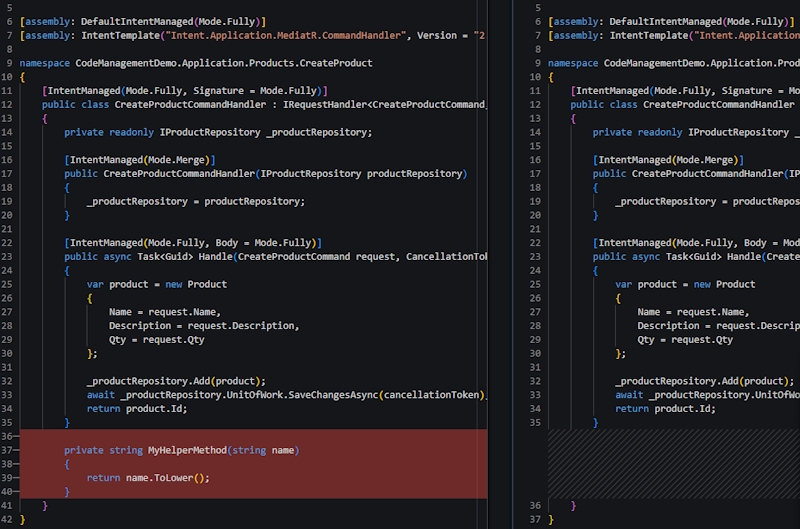
Cause: The class is fully managed ([IntentManaged(Mode.Fully, Signature = Mode.Fully)]), and Intent Architect doesn't recognize the custom method as part of the template output.
Solution 1: Apply Method-Level Ignore Attribute
Use when: You want to keep individual custom methods while keeping the class fully managed, or when you want to indicate that the class is not open for extension generally.
Add the [IntentIgnore] attribute above the custom method:
[IntentIgnore]
private string MyHelperMethod(string name)
{
    return name.ToLower();
}
Solution 2: Use Class-Level Merge Mode
Use when: You are adding multiple custom methods to the same class, or when you want to indicate that the class is generally open for extension with custom methods.
Change the class-level attribute to [IntentManaged(Mode.Merge, Signature = Mode.Fully)]. This instructs Intent Architect to merge generated methods with any developer-added methods.
[IntentManaged(Mode.Merge, Signature = Mode.Fully)]
public class CreateProductCommandHandler : IRequestHandler<CreateProductCommand, Guid>
{
    private readonly IProductRepository _productRepository;

    [IntentManaged(Mode.Merge)]
    public CreateProductCommandHandler(IProductRepository productRepository)
    {
        _productRepository = productRepository;
    }

    // Additional code omitted for brevity
}
Intent Architect wants to remove my custom code from a method (single line)
Scenario: You want to add custom code to an Intent Architect generated method, but Intent Architect wants to remove it during the Software Factory execution.
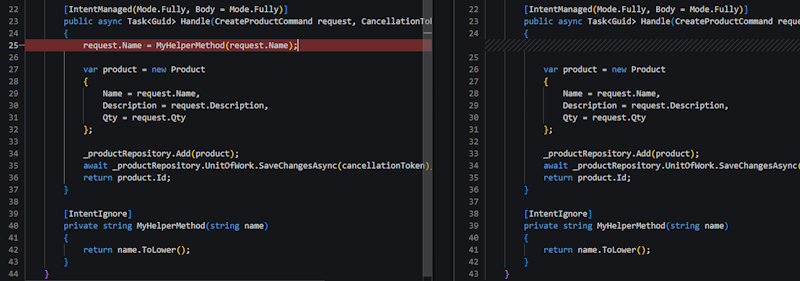
Cause: The method body is fully managed ([IntentManaged(Mode.Fully, Body = Mode.Fully)]), and Intent Architect doesn't recognize the custom code as part of the template output.
Solution 1: Use Method Body Merge Mode (Single Line)
Use when: You are adding multiple custom lines throughout a method body, or when you want to indicate that the method is generally open for extension and you anticipate it will be extended.
Change the method attribute to [IntentManaged(Mode.Fully, Body = Mode.Merge)]. This instructs Intent Architect to merge generated code with custom code within the method body. The method signature and attributes remain fully managed.
[IntentManaged(Mode.Fully, Body = Mode.Merge)]
public async Task<Guid> Handle(CreateProductCommand request, CancellationToken cancellationToken)
{
    request.Name = MyHelperMethod(request.Name);

    var product = new Product
    {
        Name = request.Name,
        Description = request.Description,
        Qty = request.Qty
    };

    _productRepository.Add(product);
    await _productRepository.UnitOfWork.SaveChangesAsync(cancellationToken);
    return product.Id;
}
Solution 2: Use Statement-Level Ignore
Use when: You want to preserve specific lines of custom code while keeping the method body fully managed, or when you want to indicate that the method is not open for extension generally.
If you need to add multiple lines to a method but still want to indicate that the method is not open for extension generally, an option is to extract those lines into their own method and add a single line to the Intent Architect generated method that invokes the new custom method.
Add the // IntentIgnore comment above the specific line or block you want to preserve. Since attributes cannot be applied to individual statements, the comment-based approach is required.
[IntentManaged(Mode.Fully, Body = Mode.Fully)]
public async Task<Guid> Handle(CreateProductCommand request, CancellationToken cancellationToken)
{
    // IntentIgnore
    request.Name = MyHelperMethod(request.Name);

    var product = new Product
    {
        Name = request.Name,
        Description = request.Description,
        Qty = request.Qty
    };

    _productRepository.Add(product);
    await _productRepository.UnitOfWork.SaveChangesAsync(cancellationToken);
    return product.Id;
}
Even though the body remains in Fully mode, the // IntentIgnore comment overrides management for that specific statement.
Intent Architect wants to remove my custom code from a method (multiple lines)
Scenario: You want to add multiple lines of custom code to an Intent Architect generated method, but Intent Architect wants to remove it during the Software Factory execution.
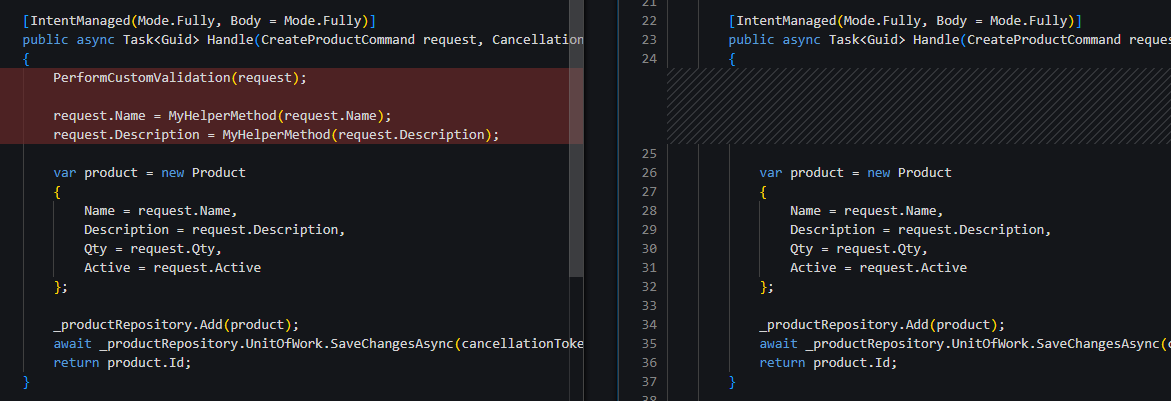
Cause: The method body is fully managed ([IntentManaged(Mode.Fully, Body = Mode.Fully)]), and Intent Architect doesn't recognize the custom code as part of the template output.
Solution 1: Use Method Body Merge Mode (Multi-line)
Use when: You are adding multiple custom lines throughout a method body, or when you want to indicate that the method is generally open for extension and you anticipate it will be extended.
Change the method attribute to [IntentManaged(Mode.Fully, Body = Mode.Merge)]. This instructs Intent Architect to merge generated code with custom code within the method body. The method signature and attributes remain fully managed.
[IntentManaged(Mode.Fully, Body = Mode.Merge)]
public async Task<Guid> Handle(CreateProductCommand request, CancellationToken cancellationToken)
{
    PerformCustomValidation(request);

    request.Name = MyHelperMethod(request.Name);
    request.Description = MyHelperMethod(request.Description);

    var product = new Product
    {
        Name = request.Name,
        Description = request.Description,
        Qty = request.Qty
    };

    _productRepository.Add(product);
    await _productRepository.UnitOfWork.SaveChangesAsync(cancellationToken);
    return product.Id;
}
Solution 2: Use Code Block-Level Ignore
Use when: You want to preserve multiple consecutive lines of custom code while keeping the method body fully managed, and you want to keep the custom code alongside the generated code.
Add the // IntentIgnore comment above a code block (enclosed in braces { }) to ignore the entire block. Since attributes cannot be applied to individual statements, the comment-based approach is required.
[IntentManaged(Mode.Fully, Body = Mode.Fully)]
public async Task<Guid> Handle(CreateProductCommand request, CancellationToken cancellationToken)
{
    // IntentIgnore
    {
        PerformCustomValidation(request);

        request.Name = MyHelperMethod(request.Name);
        request.Description = MyHelperMethod(request.Description);
    }

    var product = new Product
    {
        Name = request.Name,
        Description = request.Description,
        Qty = request.Qty
    };

    _productRepository.Add(product);
    await _productRepository.UnitOfWork.SaveChangesAsync(cancellationToken);
    return product.Id;
}
Even though the body remains in Fully mode, the // IntentIgnore comment overrides management for that specific code block statement.
Solution 3: Extract to own method
Use when: You want to preserve multiple consecutive lines of custom code while keeping the method body fully managed, and the custom code can be executed without requiring to be with the generated code.
Extract the custom code into a separate method and add a single // IntentIgnore comment above the method invocation line.
[IntentManaged(Mode.Fully, Body = Mode.Fully)]
public async Task<Guid> Handle(CreateProductCommand request, CancellationToken cancellationToken)
{
    // IntentIgnore
    request = ValidateAndUpdateCommand(request);

    var product = new Product
    {
        Name = request.Name,
        Description = request.Description,
        Qty = request.Qty
    };

    _productRepository.Add(product);
    await _productRepository.UnitOfWork.SaveChangesAsync(cancellationToken);
    return product.Id;
}

private CreateProductCommand ValidateAndUpdateCommand(CreateProductCommand request)
{
    PerformCustomValidation(request);

    request.Name = MyHelperMethod(request.Name);
    request.Description = MyHelperMethod(request.Description);

    return request;
}
Even though the body remains in Fully mode, the // IntentIgnore comment overrides management for that specific invocation statement.
I want to add to a code block generated by Intent Architect
Scenario: You need to add statements to a code block generated by Intent Architect, but the additions are removed during Software Factory execution.
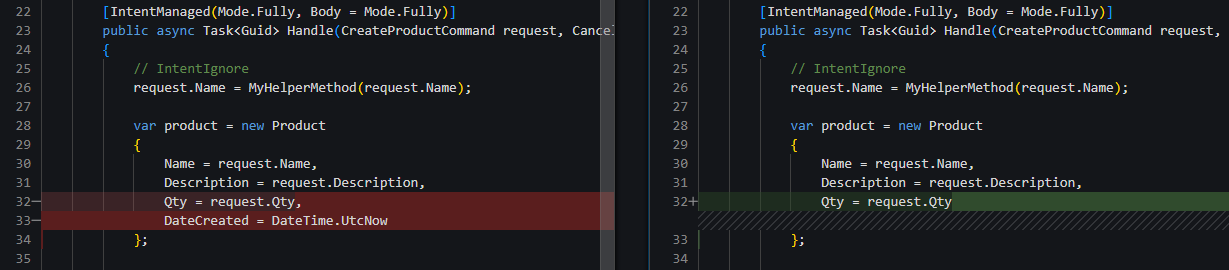
Note
This example covers adding statements to a generated block. For modifying existing statements, see Updating Generated Code Blocks.
Solution 1: Method Body Merge Mode
Use when: You are adding multiple custom statements across the method, or when you want to indicate that the method is generally open for extension and you expect it to be extended substantially.
Change the method attribute to [IntentManaged(Mode.Fully, Body = Mode.Merge)]. This allows Intent Architect to merge generated code with custom additions throughout the method body.
[IntentManaged(Mode.Fully, Body = Mode.Merge)]
public async Task<Guid> Handle(CreateProductCommand request, CancellationToken cancellationToken)
{
    // IntentIgnore
    request.Name = MyHelperMethod(request.Name);

    var product = new Product
    {
        Name = request.Name,
        Description = request.Description,
        Qty = request.Qty,
        DateCreated = DateTime.UtcNow
    };

    _productRepository.Add(product);
    await _productRepository.UnitOfWork.SaveChangesAsync(cancellationToken);
    return product.Id;
}
Solution 2: Use Statement Block Merge
Use when: You want to add statement(s) to a specific code block while keeping other parts of the method fully managed, and when you want to indicate that the method is not open for extension generally.
Add the // IntentMerge comment above the specific code block. This instructs Intent Architect to merge generated statements with your additions within that block only.
[IntentManaged(Mode.Fully, Body = Mode.Fully)]
public async Task<Guid> Handle(CreateProductCommand request, CancellationToken cancellationToken)
{
    // IntentIgnore
    request.Name = MyHelperMethod(request.Name);

    // IntentMerge
    var product = new Product
    {
        Name = request.Name,
        Description = request.Description,
        Qty = request.Qty,
        DateCreated = DateTime.UtcNow
    };

    _productRepository.Add(product);
    await _productRepository.UnitOfWork.SaveChangesAsync(cancellationToken);
    return product.Id;
}
I want to update a code block generated by Intent Architect
Scenario: You need to modify a statement within a code block generated by Intent Architect, but the changes are reverted during Software Factory execution.

Cause: When you modify an existing generated statement (like changing x => x.Active && x.Qty > 0), Intent Architect cannot merge the code because the statement itself is being replaced, not added to.
Note
This example covers modifying existing statements. For adding new statements, see Adding to Generated Code Blocks.
Solution: Use Statement-Level Ignore
Use when: You need to modify a code block generated by Intent Architect, and when you want to indicate that the method is not open for extension generally.
Add the // IntentIgnore comment above the modified statement to preserve your changes:
[IntentManaged(Mode.Fully, Body = Mode.Merge)]
public async Task<List<ProductDto>> Handle(GetProductsQuery request, CancellationToken cancellationToken)
{
    // IntentIgnore
    var products = await _productRepository.FindAllAsync(x => x.Active && x.Qty > 0, cancellationToken);
    return products.MapToProductDtoList(_mapper);
}
You can apply this to individual statements within larger blocks. In the example below, only the Description = GetProductDescription(request), line is ignored:
[IntentManaged(Mode.Fully, Body = Mode.Fully)]
public async Task<Guid> Handle(CreateProductCommand request, CancellationToken cancellationToken)
{
    // IntentIgnore
    request.Name = MyHelperMethod(request.Name);

    // IntentMerge
    var product = new Product
    {
        Name = request.Name,
        // IntentIgnore
        Description = GetProductDescription(request),
        Qty = request.Qty,
        DateCreated = DateTime.UtcNow
    };

    _productRepository.Add(product);
    await _productRepository.UnitOfWork.SaveChangesAsync(cancellationToken);
    return product.Id;
}
I want to add to a method chain generated by Intent Architect
Scenario: You need to add a method call to a fluent method chain generated by Intent Architect, but the addition is removed during Software Factory execution.

Solution: Use Inline Ignore Comment
Use when: You need to add a specific method call to a fluent method chain while keeping other parts of the chain managed by Intent Architect.
Add the // IntentIgnore comment before the specific method call you want to preserve within the chain:
builder.Property(x => x.Description)
    // IntentIgnore
    .HasAnnotation("Description", "Display name shown to customers")
    .IsRequired();
I want to override a statement Intent Architect generated with my own statement
Scenario: You want to replace a line of code generated by Intent Architect, with your own code, but the modification is being undone during the Software Factory execution.

Solution: Use Inline Ignore Comment with Match
Use when: You want to replace a line of code that Intent Architect has generated with a custom line of code, but want to keep the rest of the method fully managed.
Add the // IntentIgnore comment before the specific line you want to replace, with a Match parameter that specifies which generated line of code you want your line to replace.
The // IntentIgnore(Match="var products = ") instruction specifies: The following line should be ignored by the Software Factory, and it will replace a line of generated code which starts with var products = .
[IntentManaged(Mode.Fully, Body = Mode.Fully)]
public async Task<List<ProductDto>> Handle(GetProductsQuery request, CancellationToken cancellationToken)
{
    // IntentIgnore(Match="var products = ")
    var products = await _productRepository.FindAllActive(cancellationToken);
    return products.MapToProductDtoList(_mapper);
}
I want to add an interface or attribute to a Intent Architect generated class
Scenario: You want to add an interface or attribute to an Intent Architect generated class, but the added code element is removed during the Software Factory execution.

Solution 1: IntentMerge Attribute
Use when: You want to keep the manually added interface/attribute, as well as any Intent Architect generated interfaces/attributes, while indicating that the class is open for extension generally.
Add the [IntentMerge] attribute to the class:
[assembly: DefaultIntentManaged(Mode.Fully)]
[assembly: IntentTemplate("Intent.Application.Dtos.DtoModel", Version = "1.0")]

namespace CodeManagementDemo.Application.Products
{
    [IntentMerge]
    [Serializable]
    public record ProductDto : IAuditable
    {
        public ProductDto()
        {
            // Additional code omitted for brevity
        }

        // Additional code omitted for brevity
    }
}
Solution 2: IntentManaged Attribute with Targeted Merge
Use when: You want to keep the manually added Interface/Attribute, as well as any Intent Architect generated interfaces/attributes, while indicating that the class is not open for extension generally.
The [IntentManaged] attribute can be added to the class, which allows for a more targeted approach to allow merging on specific aspects of the class. In the example below, the class remains fully managed, which the exception of class signature (the interfaces) and the class attributes which are both in merge mode.
[assembly: DefaultIntentManaged(Mode.Fully)]
[assembly: IntentTemplate("Intent.Application.Dtos.DtoModel", Version = "1.0")]

namespace CodeManagementDemo.Application.Products
{
    [IntentManaged(Mode.Fully, Signature = Mode.Merge, Attributes = Mode.Merge)]
    [Serializable]
    public record ProductDto : IAuditable
    {
        public ProductDto()
        {
            // Additional code omitted for brevity
        }

        // Additional code omitted for brevity
    }
}