Source Control
The Source Control pane is where you review, commit and sync your changes with Git without leaving Intent Architect. It works on one Git repository at a time. In the Solution Shell, open it from the activity bar or press Ctrl+Shift+G. In the Agents Shell (Manage Agents), it's the Source Control tab in the panel on the right.
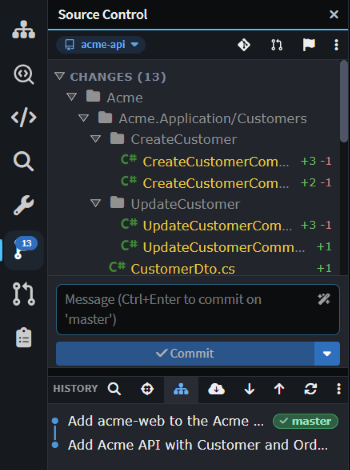 The Source Control pane on the
acme-api Git repository, with uncommitted changes, the commit box and the history.
Tip
If your solution spans several Git repositories, such as an API and a separate frontend, you can switch between them by clicking the repository name at the top of the Source Control pane. See Work across related codebases for how to set this up.
Reviewing and committing changes in the Source Control pane
The Source Control pane lists your uncommitted changes, with staged files under Staged Changes. Click a file to open its diff, or hover over it to stage it or discard its changes. The flag button in the toolbar opens Change Review for everything you haven't committed yet.
Type a message in the commit box and click Commit, or press Ctrl+Enter. The box's placeholder names the branch you're committing to, and its AI button writes a message for you. The caret next to Commit offers Amend last commit and Stash changes.
Below the commit box, History lists the Git repository's commits, with Fetch, Pull and Push in its toolbar.
Git Explorer and Pull Requests
Branches, tags, worktrees and the full history are in the Git Explorer tab, which you open from the Source Control pane's toolbar. Git Explorer lists every Git repository at once, each with its branches and worktrees. Pull requests are in the Pull Requests panel; see Pull Requests.
Related articles
- Work across related codebases - add a related Git repository and commit to each one.
- Codebase Explorer - the Codebase pane, where related folders are added.
- Change Review - reviewing uncommitted changes before you commit.
- Pull Requests - creating and reviewing pull requests.
- Git and SCM guidance - which Intent Architect files to commit.
- Agents Shell and Solution Shell - how the Agents Shell and the Solution Shell differ.
- Manage Agents - the Agents Shell and its panels.