How to add project dependencies (C#)
Add a reference as needed to access a referenced type
When a template uses GetTypeName(...) and the type is from another template which is output to a different .csproj, then Intent Architect will automatically add a <ProjectReference /> element to the .csproj.
Add a reference manually to a project containing a particular role
You can specify a project dependency to another project in the Visual Studio designer based on it containing a particular Role. Consider the following layout in the Visual Studio designer:
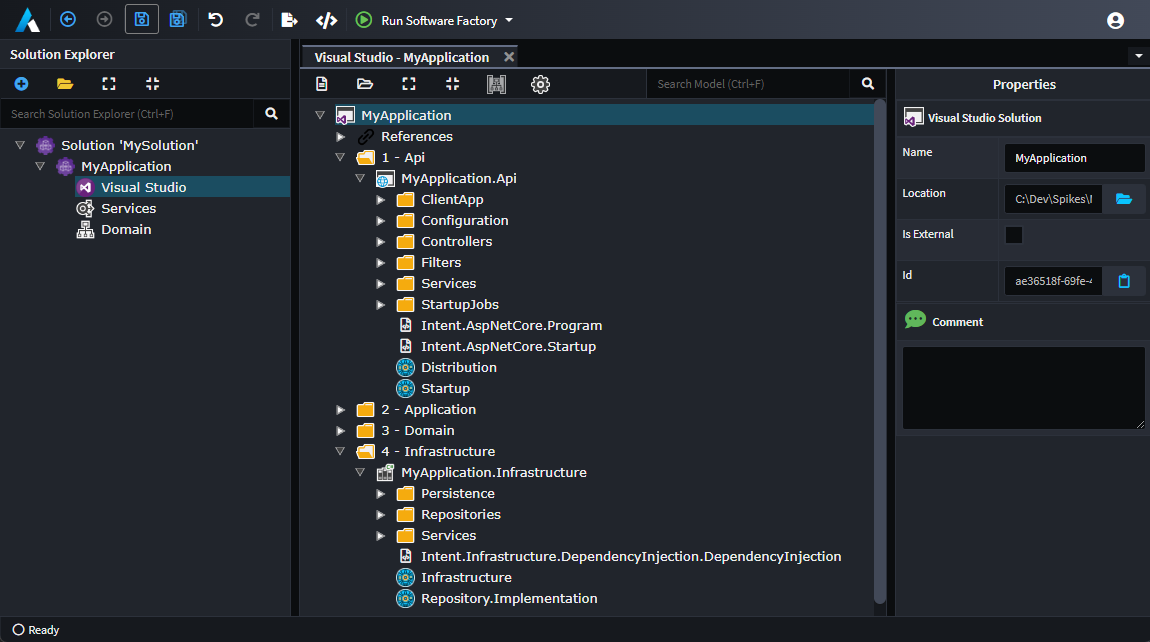
From the above example, you can specify MyApplication.Api to have a reference to MyApplication.Infrastructure. In the constructor for a template within the project where the reference should be created, for example Intent.AspNetCore.Startup, add the following:
AddProjectDependency("Infrastructure");
Infrastructure in this case is the name of a role which can be seen in the above screenshot as being within the MyApplication.Infrastructure project. With this line added, the software factory when running the Intent.AspNetCore.Startup template will ensure that a project reference exists to the project containing the role, MyApplication.Infrastructure.
Add a reference manually to a project which is not modelled in the Visual Studio designer
The following will add a <ProjectReference/> with its Include set to any arbitrary relative path that you specify:
AddAssemblyReference(new ProjectReference("..\\Project\\Project.csproj"));
Note
Even on operating systems using / as their path separator, a <ProjectReference/> should have its path separated using a \.
Note
ProjectReference is available from the Intent.Modules.Common.VisualStudio namespace and requires that at least version 3.8.2 of the Intent.Common.CSharp module is installed.