Intent.EntityFrameworkCore.TemporalTables
This modules adds support for SQL Server temporal tables. in Entity Framework Core. Temporal tables allow you to automatically track historical data changes, enabling you to easily query historical states of your data.
Configure Temporal Table
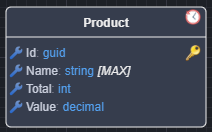
To configure a class as a temporal table in the Domain Designer, apply the Temporal Table stereotype to the class.
Temporal Table annotation
Once applied, the class will be annotated with an icon to indicate it has been configured as a temporal table:
Optional Configuration Properties
There are three optional properties available for customization of the temporal table configuration. You can leave these properties as is to use the default values:
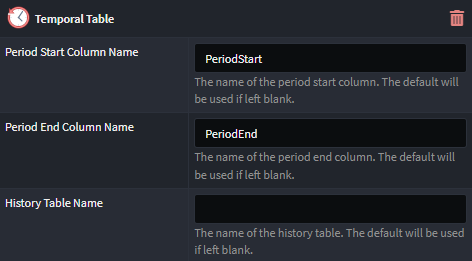
- Period Start Column Name: Override the default period start column name (if left blank, the default EntityFramework Core value of PeriodStart will be used).
- Period End Column Name: Override the default period end column name (if left blank, the default EntityFramework Core value of PeriodEnd will be used).
- History Table Name: Override the default history table name (if left blank, the default EntityFramework Core value of History will be used)
After configuring the temporal table, you will need to create an Entity Framework migration. This will generate the necessary schema changes in the database to reflect the temporal table configuration. Follow the usual migration creation process to achieve this.
Access Temporal Information
By default, Intent Architect will generate new methods called FindHistoryAsync on the repository for a specific entity, enabling the retrieval of historical data.
This method accepts a TemporalHistoryQueryOptions instance as a parameter, which defines how the temporal data should be queried.
TemporalHistoryQueryOptions Fields
The TemporalHistoryQueryOptions object includes the following optional fields:
- QueryType: Defaults to
All(described below) if not provided. - DateFrom: Defaults to
DateTime.MinValueif not provided. - DateTo: Defaults to
DateTime.MaxValueif not provided.
QueryType Options
The QueryType field can be set to one of the following five options, which interact with the date fields to determine which historical data is retrieved:
- All: (Default) Ignores the date values (even if supplied) and returns all history rows.
- AsOf: Returns rows that were active (current) at the specified UTC time,
DateFrom. - FromTo: Returns all rows that were active between the two given UTC times,
DateFromandDateTo. - Between: Similar to
FromTo, but includes rows that became active at the upper boundary (DateTo). - ContainedIn: Returns all rows that started and ended being active between the two given UTC times,
DateFromandDateTo.
For additional context on these query types, refer to the Entity Framework Core documentation.