Intent.ValueObjects
This module provides a simple Value Object implementation in C# based on the Microsoft suggested pattern.
What is a ValueObject
More information can be found on the official Microsoft documentation website, but in summary:
- Value Objects do not have an identity – they are defined solely by their attributes.
- They are immutable – once created, their state cannot be changed.
What's in this module?
- Microsoft suggested pattern implementation.
Domain Designerextensions that enable modelingValueObjectsin theDomain Designer.
Modelling ValueObjects
Once this module is installed, the New Value Object menu item will be available, allowing Value Objects to be added in the Domain Designer.
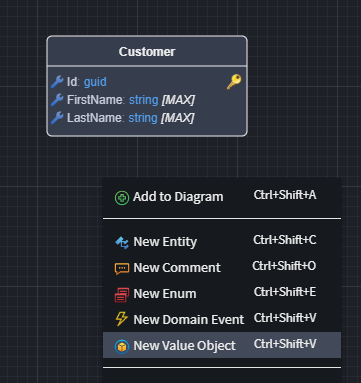
ValueObjects are modelled in a similar fashion to Entities.
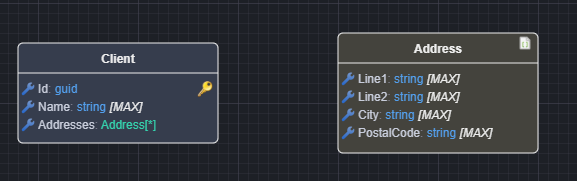
It can be applied to Entities as either Attributes...
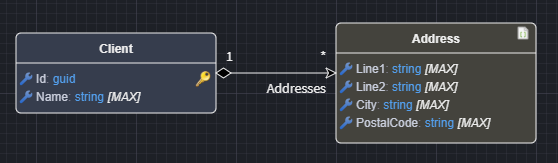
Or Composite associations...
Value Objects containing Value Objects
A Value Object can contain other Value Objects, either through an attribute typed as the other Value Object, or through an association drawn from one Value Object to another. Both generate the same kind of member on the Value Object class:
| Modelled as | Generated member |
|---|---|
Attribute, or association with a target multiplicity of 1 |
Required property |
Attribute marked nullable, or association with a target multiplicity of 0..1 |
Nullable property |
Collection attribute, or association with a target multiplicity of 0..* |
IEnumerable<T> property |
Associations from a Value Object to anything other than another Value Object (for example an Entity) are not part of the Value Object and are ignored. Value Objects should not refer back to the Entities which own them.
ValueObjects and Primary Keys
Note
Value Objects should not be modeled with a primary key.
Unlike Entities, which have a unique identifier, Value Objects are defined by their attributes rather than an identity. If two Value Objects have the same data, they are considered equal. Therefore, assigning a primary key would contradict their purpose and introduce unnecessary complexity. Instead, Value Objects are typically embedded within Entities rather than stored as separate database records.
JSON Serialization
Value Objects can be serialized to JSON and stored as a single database column, allowing structured data to be persisted without normalizing into separate tables.
When to Use JSON Serialization
Use JSON serialization when your Value Objects have the following domain characteristics:
- No independent identity — they exist only as part of their parent Entity and are never loaded or queried independently
- Dependent lifecycle — they are created, updated, and deleted together with their parent Entity
- Value equality — two instances with identical attributes are considered equal (not distinguished by ID)
- Always accessed together — they are never accessed separately from their parent, even if your database supports querying nested JSON
How to Enable JSON Serialization
Model your Value Object: Create a Value Object in the Domain Designer with the properties you need (e.g.,
AddresswithLine1,Line2,City,PostalCode)Add the Serialization Settings stereotype: Select your Value Object and apply the Serialization Settings stereotype
Set Type to JSON: In the properties panel, set the
Typefield toJSON
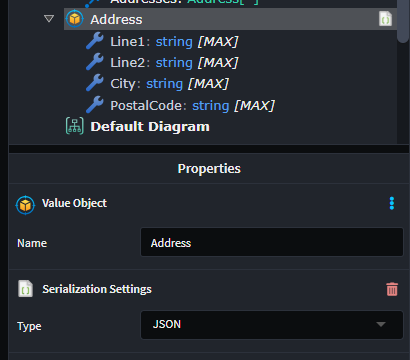
- Associate with your Entity: Create a collection relationship from your Entity (e.g.,
Client) to the Value Object (e.g.,Addresses)
When persisted to the database, the Addresses collection is serialized to JSON and stored in a single column. The database handler applies the optimal JSON column type for your database provider—see EntityFrameworkCore JSON Column Storage for details on how each database stores this data natively.