Designer Scripting: Advanced Mappings
Learn how to automate advanced mapping creation using scripts. This guide is for module builders and developers who want to programmatically create mappings between designer elements.
What You'll Learn
This guide covers:
- Creating basic field-to-field mappings
- Mapping collections and nested objects
- Querying and validating existing mappings
- Common patterns and troubleshooting
What Are Advanced Mappings?
Advanced Mappings are blueprints for code generation. When you map a CreateOrder command to an Order entity, you're telling templates:
- Which constructor or method to call (Invocation Mapping)
- Which fields map to which properties (Data Mapping)
- How to filter or query data (Filter Mapping)
Templates read these mappings and can generate code like this:
// Your mapping creates this blueprint:
// Invocation: new Order()
// Data: RefNo → RefNo, CreatedDate → CreatedDate

// Template generates:
var order = new Order
{
    RefNo = command.RefNo,
    CreatedDate = command.CreatedDate
};
Learn through examples
Complete setup script
Important
Before running any examples, execute this comprehensive setup script. It creates all the model elements needed for every example in this guide.
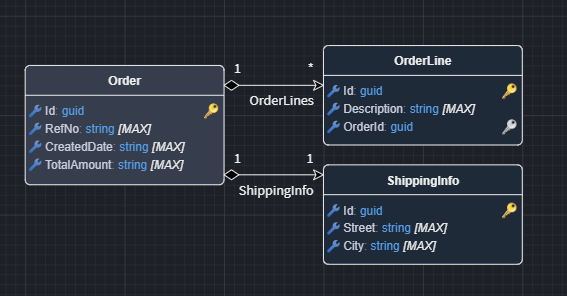
Step 1: Domain designer setup
Open your Domain Designer and run this script:
// Get the first package
let packageId = getPackages()[0]?.id;
if (!packageId) {
    await dialogService.error("Create a Domain package first");
    return;
}

const GuidTypeId = "6b649125-18ea-48fd-a6ba-0bfff0d8f488";

// Create Order entity with attributes
let order = createElement("Class", "Order", packageId);
createElement("Attribute", "RefNo", order.id);
createElement("Attribute", "CreatedDate", order.id);
createElement("Attribute", "TotalAmount", order.id);

// Create OrderLine entity for collection example
let orderLine = createElement("Class", "OrderLine", packageId);
createElement("Attribute", "Description", orderLine.id);

// Order -> OrderLines (1:many)
let orderLinesAssoc = createAssociation("Association", order.id, orderLine.id, "OrderLines");
orderLinesAssoc.typeReference.setIsCollection(true);
orderLinesAssoc.getOtherEnd().typeReference.setIsCollection(false);

// Create ShippingInfo for nested object example
let shippingInfo = createElement("Class", "ShippingInfo", packageId);
createElement("Attribute", "Street", shippingInfo.id);
createElement("Attribute", "City", shippingInfo.id);

// Order -> ShippingInfo (1:1)
let shippingAssoc = createAssociation("Association", order.id, shippingInfo.id, "ShippingInfo");
shippingAssoc.typeReference.setIsCollection(false);
shippingAssoc.getOtherEnd().typeReference.setIsCollection(false);

const diagram = getCurrentDiagram();
let space = diagram.findEmptySpace(diagram.getViewPort().getCenter(),  { width: 500, height: 550 });
diagram.layoutVisuals(getPackages()[0], space, true);

await dialogService.info("Domain entities created!");
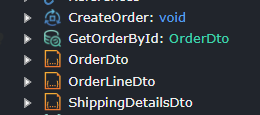
Step 2: Services designer setup
Switch to your Services Designer and run this script:
// Get the first package
let packageId = getPackages()[0]?.id;
if (!packageId) {
    await dialogService.error("Create a Services package first");
    return;
}

const GuidTypeId = "6b649125-18ea-48fd-a6ba-0bfff0d8f488";

// Create CreateOrder command
let createOrder = createElement("Command", "CreateOrder", packageId);
createElement("DTO-Field", "RefNo", createOrder.id);
createElement("DTO-Field", "CreatedDate", createOrder.id);
createElement("DTO-Field", "TotalAmount", createOrder.id);

// Create OrderLineDto for collection example
let orderLineDto = createElement("DTO", "OrderLineDto", packageId);
createElement("DTO-Field", "Description", orderLineDto.id);

// Add OrderLines collection to CreateOrder
let orderLinesField = createElement("DTO-Field", "OrderLines", createOrder.id);
orderLinesField.typeReference.setType(orderLineDto.id);
orderLinesField.typeReference.setIsCollection(true);

// Create ShippingDetailsDto for nested example
let shippingDetailsDto = createElement("DTO", "ShippingDetailsDto", packageId);
createElement("DTO-Field", "Street", shippingDetailsDto.id);
createElement("DTO-Field", "City", shippingDetailsDto.id);

// Add ShippingDetails to CreateOrder
let shippingField = createElement("DTO-Field", "ShippingDetails", createOrder.id);
shippingField.typeReference.setType(shippingDetailsDto.id);

// Create GetOrderById query
let getOrderById = createElement("Query", "GetOrderById", packageId);
let idField = createElement("DTO-Field", "Id", getOrderById.id);
idField.typeReference.setType(GuidTypeId);

// Create OrderDto for query return
let orderDto = createElement("DTO", "OrderDto", packageId);
idField = createElement("DTO-Field", "Id", orderDto.id);
idField.typeReference.setType(GuidTypeId);
createElement("DTO-Field", "RefNo", orderDto.id);
createElement("DTO-Field", "CreatedDate", orderDto.id);
createElement("DTO-Field", "TotalAmount", orderDto.id);

getOrderById.typeReference.setType(orderDto.id);

await dialogService.info("Services elements created!");
What was created:
Order,OrderLine,ShippingInfoentities with associations (Domain)CreateOrdercommand with fields, collections, and nested objects (Services)GetOrderByIdquery andOrderDtofor query example (Services)
All examples run in the Services Designer. Make sure you've completed the setup scripts first.
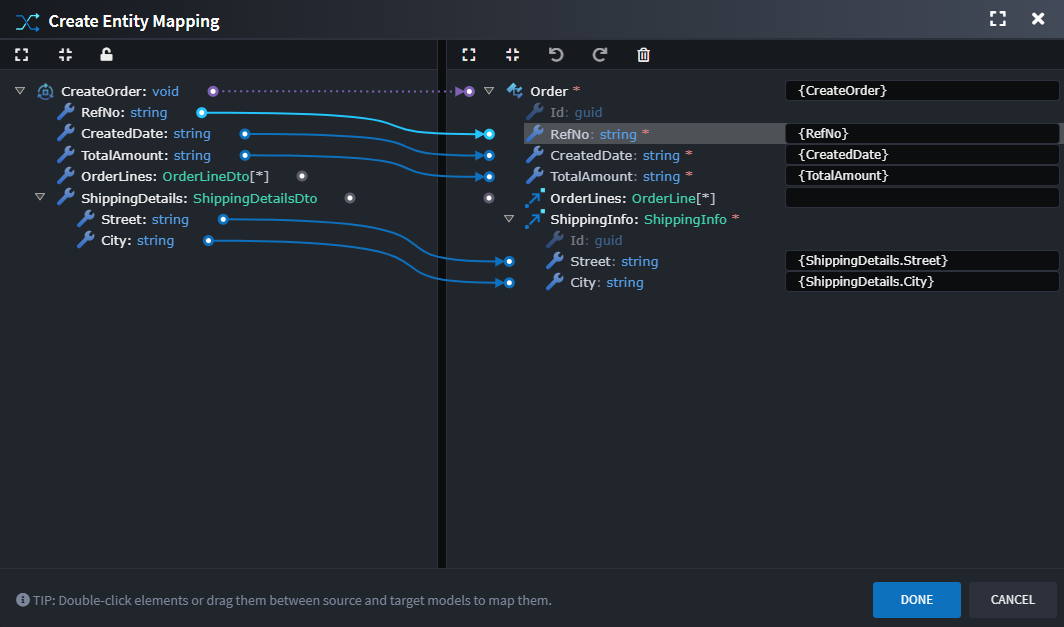
Example 1: Map command fields to Entity
Map CreateOrder command fields to Order entity attributes using the three-step process.
// Find the command and entity
let command = lookupTypesOf("Command").find(x => x.getName() === "CreateOrder");
let entity = lookupTypesOf("Class").find(x => x.getName() === "Order");

// Step 1: Create association (declares intent)
let action = createAssociation("Create Entity Action", command.id, entity.id);

// Step 2: Create the mapping
let mapping = action.createAdvancedMapping(command.id, entity.id);

// Step 3a: Add invocation (tells template to call constructor)
mapping.addMappedEnd("Invocation Mapping", [command.id], [entity.id]);

// Step 3b: Map simple fields
let fields = ["RefNo", "CreatedDate", "TotalAmount"];
fields.forEach(name => {
    let field = command.getChildren("DTO-Field").find(x => x.getName() === name);
    let attr = entity.getChildren("Attribute").find(x => x.getName() === name);

    if (field && attr) {
        mapping.addMappedEnd(
            "Data Mapping",
            [command.id, field.id],  // Source: command.Field
            [entity.id, attr.id]     // Target: entity.Attribute
        );
    }
});

// Step 3c: Map shipping info fields (nested object with multi-level paths)
let shippingField = command.getChildren("DTO-Field").find(x => x.getName() === "ShippingDetails");
let shippingAssoc = entity.getAssociations("Association").find(x => x.getName() === "ShippingInfo");

if (shippingField && shippingAssoc) {
    let shippingDto = shippingField.typeReference.getType();
    let shippingEntity = shippingAssoc.typeReference.getType();

    // Map each nested field
    ["Street", "City"].forEach(fieldName => {
        let dtoField = shippingDto.getChildren("DTO-Field").find(x => x.getName() === fieldName);
        let entityAttr = shippingEntity.getChildren("Attribute").find(x => x.getName() === fieldName);

        if (dtoField && entityAttr) {
            mapping.addMappedEnd(
                "Data Mapping",
                [command.id, shippingField.id, dtoField.id],      // command.ShippingDetails.Street
                [entity.id, shippingAssoc.id, entityAttr.id]      // entity.ShippingInfo.Street
            );
        }
    });
}

await dialogService.info("Mapping created!");
Understanding the code:
lookupTypesOf("Command")- Finds all Commands in the Services DesignercreateAssociation()- Creates "Create Entity Action" connecting command to entitycreateAdvancedMapping()- Creates the mapping blueprint on the associationaddMappedEnd()- Adds each transformation rule (Invocation + Data mappings)- Path arrays
[command.id, field.id]- Represents "command.RefNo" traversal - Nested fields - Use 3-level paths like
[command.id, shippingField.id, streetField.id]to map individual nested properties
Possible generated code:
var order = new Order  // From Invocation Mapping
{
    RefNo = command.RefNo,             // From Data Mapping
    CreatedDate = command.CreatedDate, // From Data Mapping
    TotalAmount = command.TotalAmount, // From Data Mapping
    ShippingInfo = new ShippingInfo
    {
        Street = command.ShippingDetails.Street,  // From 3-level Data Mapping
        City = command.ShippingDetails.City       // From 3-level Data Mapping
    }
};
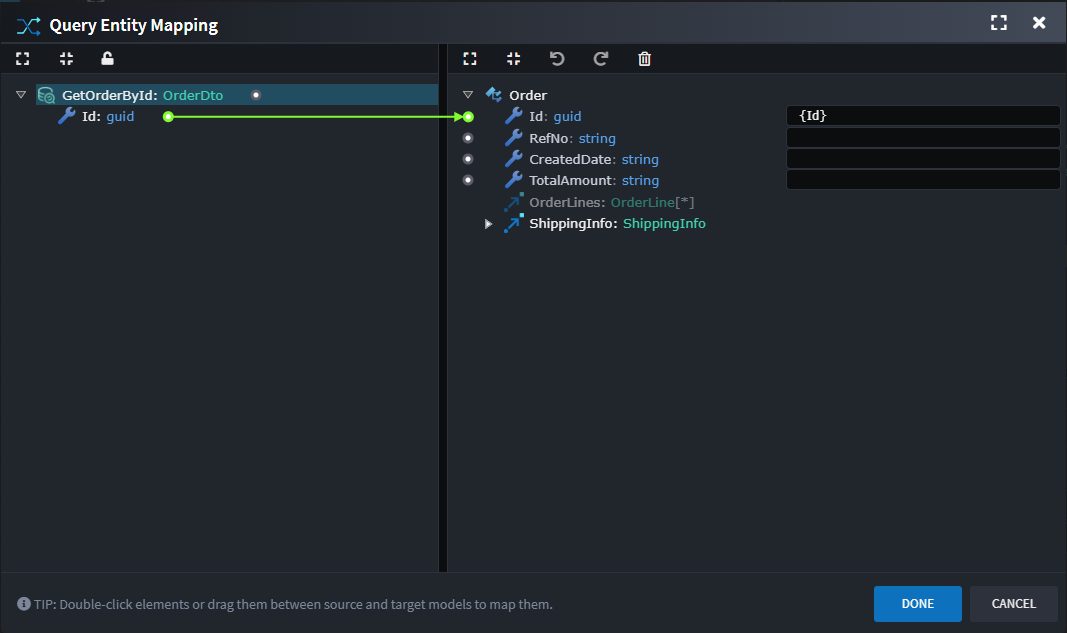
Example 2: Filter mapping for queries
Create a query mapping that filters by ID.
let query = lookupTypesOf("Query").find(x => x.getName() === "GetOrderById");
let entity = lookupTypesOf("Class").find(x => x.getName() === "Order");

// Create query action and mapping
let action = createAssociation("Query Entity Action", query.id, entity.id);
let mapping = action.createAdvancedMapping(query.id, entity.id);

// Map Id field to Id attribute (filter condition)
let idField = query.getChildren("DTO-Field").find(x => x.getName() === "Id");
let idAttr = entity.getChildren("Attribute").find(x => x.getName() === "Id");

if (idField && idAttr) {
    mapping.addMappedEnd(
        "Filter Mapping",  // Tells template this is a WHERE clause
        [query.id, idField.id],
        [entity.id, idAttr.id]
    );
}

await dialogService.info("Filter mapping created!");
Understanding the code:
"Query Entity Action"- Association type for query operations"Filter Mapping"- Tells templates to generate a WHERE clause- Same path array pattern:
[parent.id, child.id]
Possible generated code:
var order = dbContext.Orders
    .Where(x => x.Id == query.Id)  // From Filter Mapping
    .FirstOrDefault();
Example 3: Map collection fields
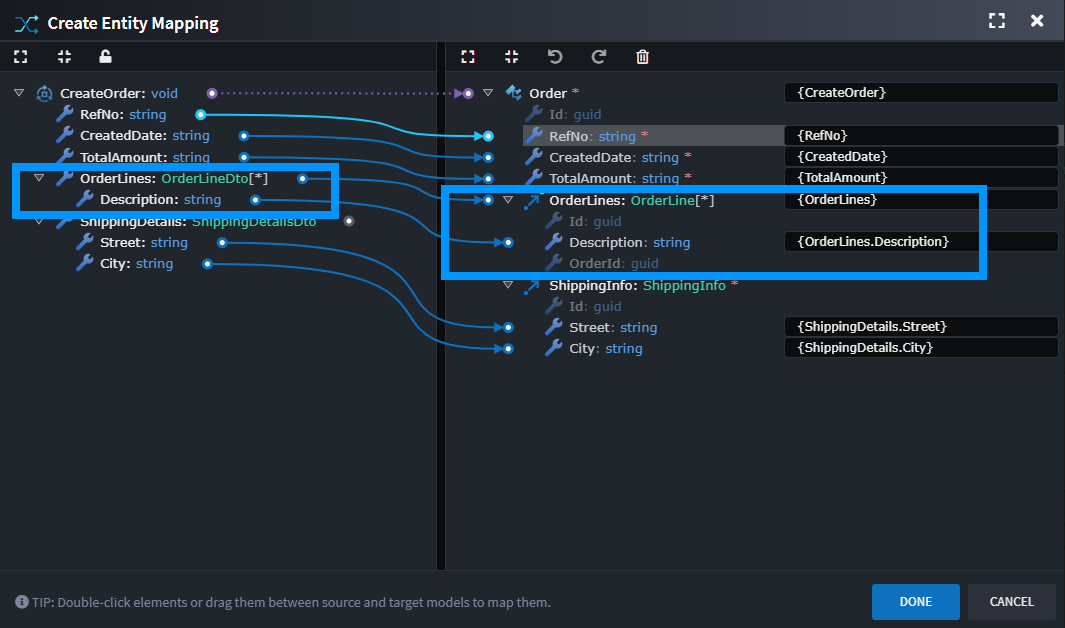
Map a collection property from command to entity.
let command = lookupTypesOf("Command").find(x => x.getName() === "CreateOrder");
let entity = lookupTypesOf("Class").find(x => x.getName() === "Order");

// Get or create mapping (reuse from Example 1 if it exists)
let action = command.getAssociations("Create Entity Action")
    .find(x => x.typeReference?.typeId === entity.id);
if (!action) {
    action = createAssociation("Create Entity Action", command.id, entity.id);
}

let mapping = action.getAdvancedMappings()[0];
if (!mapping) {
    mapping = action.createAdvancedMapping(command.id, entity.id);
}

// Find collection field and association
let orderLinesField = command.getChildren("DTO-Field").find(x => x.getName() === "OrderLines");
let orderLinesAssoc = entity.getAssociations("Association").find(x => x.getName() === "OrderLines");

if (orderLinesField && orderLinesAssoc) {
    // Map the collection
    mapping.addMappedEnd(
        "Data Mapping",
        [command.id, orderLinesField.id],
        [entity.id, orderLinesAssoc.id]
    );

    // Map fields within the collection
    let lineDto = orderLinesField.typeReference.getType();
    let lineEntity = orderLinesAssoc.typeReference.getType();

    let descField = lineDto.getChildren("DTO-Field").find(x => x.getName() === "Description");
    let descAttr = lineEntity.getChildren("Attribute").find(x => x.getName() === "Description");

    if (descField && descAttr) {
        mapping.addMappedEnd(
            "Data Mapping",
            [command.id, orderLinesField.id, descField.id],  // 3-level path
            [entity.id, orderLinesAssoc.id, descAttr.id]     // command.OrderLines[].Description
        );
    }
}

await dialogService.info("Collection mapping created!");
Understanding the code:
- 3-level paths
[command.id, orderLinesField.id, descField.id]- Represents "command.OrderLines[].Description" - First
addMappedEnd()maps the collection itself - Second
addMappedEnd()maps fields within each collection item
Possible generated code:
OrderLines = command.OrderLines.Select(line => new OrderLine
{
    Description = line.Description  // From 3-level Data Mapping
}).ToList()
Example 4: Query and Validate Mappings
Check existing mappings and find unmapped fields.
let command = lookupTypesOf("Command").find(x => x.getName() === "CreateOrder");
let entity = lookupTypesOf("Class").find(x => x.getName() === "Order");

// Find the association
let action = command.getAssociations("Create Entity Action")
    .find(x => x.typeReference?.typeId === entity.id);

if (!action) {
    console.log("No mapping found");
    return;
}

// Get the mapping
let mapping = action.getAdvancedMappings()[0];
if (!mapping) {
    console.log("No advanced mapping found");
    return;
}

// Show what's mapped
console.log("\n=== Mapped Fields ===");

mapping.getMappedEnds().forEach(end => {
    let sourcePath = end.sourcePath.map(p => p.name).join(".");
    let targetPath = end.targetPath.map(p => p.name).join(".");
    console.log(`${end.mappingType}: ${sourcePath} → ${targetPath}`);
});

// Find unmapped attributes
let targetAttrs = entity.getChildren("Attribute");
let mappedAttrIds = new Set();

mapping.getMappedEnds().forEach(end => {
    if (end.targetPath.length > 0) {
        let lastElement = end.targetPath[end.targetPath.length - 1];
        mappedAttrIds.add(lastElement.id);
    }
});

let unmapped = targetAttrs.filter(attr => !mappedAttrIds.has(attr.id));

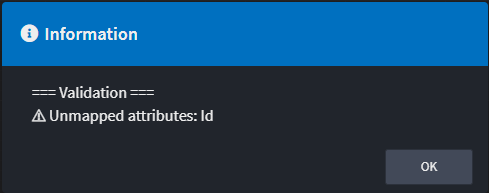
let results = "=== Validation ===\n";

if (unmapped.length > 0) {
    results += `⚠ Unmapped attributes: ${unmapped.map(a => a.getName()).join(", ")}`;
} else {
    results += "✓ All attributes mapped";
}

await dialogService.info(results);
Understanding the code:
getAdvancedMappings()- Returns all advanced mappings on the associationgetMappedEnds()- Returns all mapped ends (Invocation + Data mappings)sourcePath.map(p => p.name).join(".")- Converts path array to readable string- Uses
Setto track which attributes are mapped - Finds unmapped attributes by comparing all attributes vs mapped ones
// Querying mappings action.getAdvancedMappings() // Get all mappings action.getAdvancedMapping(typeId) // Get specific mapping type mapping.getMappedEnds() // Get all mapped ends
Common Issues
Duplicate mappings
Cause: Running the same script multiple times.
Fix: Check if mapping exists before creating:
let action = element.getAssociations("Create Entity Action")
    .find(x => x.typeReference?.typeId === targetElement.id);

if (!action) {
    action = createAssociation("Create Entity Action", element.id, targetElement.id);
}
Wrong generated code
Cause: Incorrect path arrays. Must be in traversal order: [parent.id, child.id].
Fix: Build paths from root to leaf:
// ✅ Correct: command → ShippingDetails → Street
[command.id, shippingDetailsField.id, streetField.id]

// ❌ Wrong: Missing intermediate element
[command.id, streetField.id]
Quick Reference
Common Mapping Type IDs
// Use these constants at the top of your scripts
const CreateEntityMappingId = "5f172141-fdba-426b-980e-163e782ff53e";
const UpdateEntityMappingId = "01721b1a-a85d-4320-a5cd-8bd39247196a";
const QueryEntityMappingId = "25f25af9-c38b-4053-9474-b0fabe9d7ea7";
Key Methods
// Finding elements
lookupTypesOf("Command")                      // Get all commands
element.getChildren("DTO-Field")              // Get child elements
element.getAssociations("Create Entity Action") // Get associations by type

// Creating mappings
createAssociation(type, sourceId, targetId)   // Step 1: Create association
action.createAdvancedMapping(srcId, tgtId)    // Step 2: Create mapping
mapping.addMappedEnd(type, sourcePath, targetPath) // Step 3: Add mapped ends
Next Steps
- Designer Scripting Guide - Learn the full Designer Scripting API.
- Advanced Mapping Tutorial - Configure mapping-enabled designers in the Module Builder.
- API Documentation - Review Full API Documentation in the Designer Scripting reference for detailed method signatures.