Software Factory Extensions
Software Factory Extensions allow hooking into any of the various Software Execution phases to perform additional arbitrary actions which wouldn't make sense to be performed by a particular template. Examples of use cases for Software Factory extensions include (but are not limited to) post processing which needs to be performed after all templates have been executed or perhaps manipulating templates from other modules.
Factory Extensions are powerful tools in Intent Architect that allow you to:
- Manipulate code generated by other templates
- Add cross-cutting concerns across multiple modules
- Execute external processes during code generation
- Register metadata providers and services
- Coordinate complex multi-template scenarios
This article assumes that you have a Module Builder Intent Architect application already set up, please refer to our Create Module article for details on how to make a Module Building Intent Architect application.
Creating a Software Factory Extension
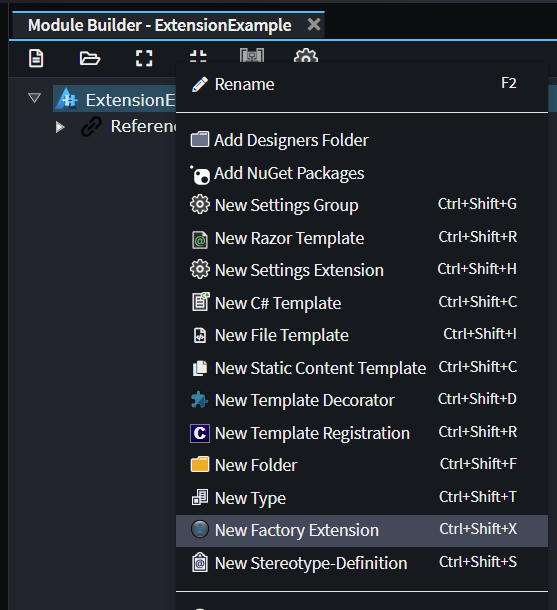
Creating a Software Factory extension is done through the Module Builder by using the New Factory Extension context menu option:
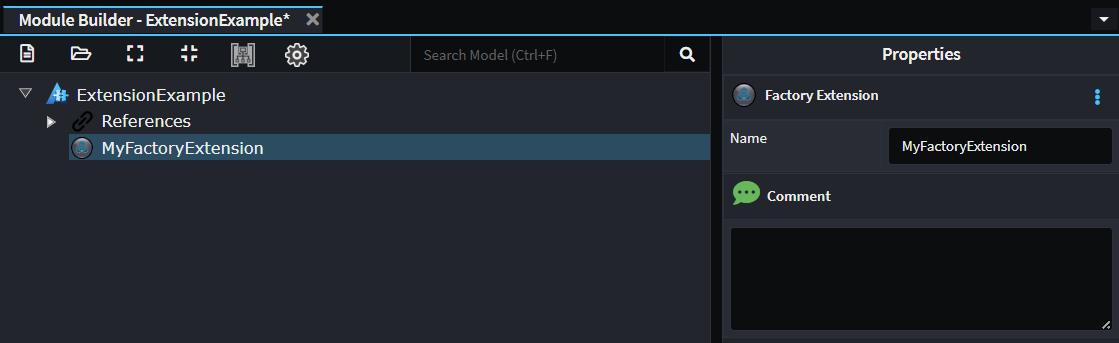
Choose a name for the Factory Extension which completes the work needed inside the Module Builder designer as there is nothing else which can be configured:
Run the Software Factory, apply changes and then open the generated file in Visual Studio. Factory Extensions always have the same boilerplate content:
[IntentManaged(Mode.Fully, Body = Mode.Merge)]
public class MyFactoryExtension : FactoryExtensionBase
{
    public override string Id => "ExtensionExample.MyFactoryExtension";

    [IntentManaged(Mode.Ignore)]
    public override int Order => 0;

    /// <summary>
    /// This is an example override which would extend the
    /// <see cref="ExecutionLifeCycleSteps.AfterTemplateRegistrations"/> phase of the Software Factory execution.
    /// See <see cref="FactoryExtensionBase"/> for all available overrides.
    /// </summary>
    /// <remarks>
    /// It is safe to update or delete this method.
    /// </remarks>
    protected override void OnAfterTemplateRegistrations(IApplication application)
    {
        // Your custom logic here.
    }

    /// <summary>
    /// This is an example override which would extend the
    /// <see cref="ExecutionLifeCycleSteps.BeforeTemplateExecution"/> phase of the Software Factory execution.
    /// See <see cref="FactoryExtensionBase"/> for all available overrides.
    /// </summary>
    /// <remarks>
    /// It is safe to update or delete this method.
    /// </remarks>
    protected override void OnBeforeTemplateExecution(IApplication application)
    {
        // Your custom logic here.
    }
}
As noted in the comments above each of the methods, they are merely examples of overriding the relevant base methods. If you don't need one or both of these overrides, it is safe to delete the methods.
Understanding the Execution Lifecycle
Factory Extensions can hook into various phases of the Software Factory execution. Each overridden method is called during a particular phase of the Software Factory execution, the following is a list of the all phases which can be hooked into in their execution order:
| Method Name | Description |
|---|---|
| OnStart | Called once the Software Factory start up is complete. |
| OnBeforeMetadataLoad | Called before metadata loading commences. Typically used to register custom metadata providers. |
| OnAfterMetadataLoad | Called after metadata loading is complete. |
| OnBeforeTemplateRegistrations | Called before template registration and instantiation (construction) is performed. |
| OnAfterTemplateRegistrations | Called after template registration and instantiation (construction) has been completed. This is the most commonly overridden method for Factory Extensions. |
| OnBeforeTemplateExecution | Called before the RunTemplate is called on all template. |
| OnAfterTemplateExecution | Called after the RunTemplate called has been completed on all templates. |
| OnBeforeCommitChanges | Called immediately before "Changes" view is presented in the Software Factory window. |
| OnAfterCommitChanges | Called after the user has pressed "Apply" on the Software Factory window and all confirmed changes have been committed to the file system. |
Here's a comprehensive example showing all available lifecycle hooks:
public class MyFactoryExtension : FactoryExtensionBase
{
    public override string Id => "MyModule.MyFactoryExtension";
    public override int Order => 0; // Controls execution order

    protected override void OnStart(IApplication application)
    {
        // Called once Software Factory startup is complete
    }

    protected override void OnBeforeMetadataLoad(IApplication application)
    {
        // Called before metadata loading - register custom providers here
    }

    protected override void OnAfterMetadataLoad(IApplication application)
    {
        // Called after all metadata is loaded
    }

    protected override void OnBeforeTemplateRegistrations(IApplication application)
    {
        // Called before templates are registered and instantiated
    }

    protected override void OnAfterTemplateRegistrations(IApplication application)
    {
        // Called after all templates are instantiated
        // MOST COMMONLY USED - templates are available for manipulation
    }

    protected override void OnBeforeTemplateExecution(IApplication application)
    {
        // Called before templates start executing
        // COMMONLY USED - apply distributed events changes here
    }

    protected override void OnAfterTemplateExecution(IApplication application)
    {
        // Called after all templates have executed
    }

    protected override void OnBeforeCommitChanges(IApplication application)
    {
        // Called before the Changes view is presented
    }

    protected override void OnAfterCommitChanges(IApplication application)
    {
        // Called after user applies changes to the file system
    }
}
Template Discovery Patterns
Understanding Template Discovery Methods
Factory Extensions can discover templates using two primary approaches:
- TemplateId-based discovery - Specific and precise
- Role-based discovery - Flexible and decoupled
TemplateId-Based Discovery
Use specific Template IDs when you need to target exact templates:
protected override void OnAfterTemplateRegistrations(IApplication application)
{
    // Find specific template by exact ID
    var entityTemplate = application.FindTemplateInstance<ICSharpFileBuilderTemplate>("Intent.Entities.DomainEntity");

    // Find all instances of a specific template ID
    var commandTemplates = application.FindTemplateInstances<ICSharpFileBuilderTemplate>("Intent.Application.MediatR.CommandModels");

    // Find template for specific model instance
    if (application.TryGetTemplate<ICSharpFileBuilderTemplate>("Intent.Entities.DomainEntity", someEntityModel, out var specificEntityTemplate))
    {
        // Work with the specific template instance
    }
}
Role-Based Discovery
Use roles for flexible, decoupled template discovery:
protected override void OnAfterTemplateRegistrations(IApplication application)
{
    // Find templates by role - more flexible than TemplateId
    var allEntities = application.FindTemplateInstances<ICSharpFileBuilderTemplate>("Domain.Entity");
    var allRepositories = application.FindTemplateInstances<ICSharpFileBuilderTemplate>("Domain.Repository");
    var allControllers = application.FindTemplateInstances<ICSharpFileBuilderTemplate>("Application.Controller");

    // Find templates with hierarchical roles
    var auditableEntities = application.FindTemplateInstances<ICSharpFileBuilderTemplate>("Domain.Entity.Auditable");
    var securedControllers = application.FindTemplateInstances<ICSharpFileBuilderTemplate>("Application.Controller.Secured");

    // Broad role matching - finds all templates starting with "Domain"
    var allDomainTemplates = application.FindTemplateInstances<ICSharpFileBuilderTemplate>("Domain");
}
Tip
To work out the Template Id of a template you want to be able to find, either refer to the TemplateId field in the source code of the template or alternatively if it's a C# file you can open a file generated by the template and copy the value of the IntentTemplate assembly attribute at the top of the file.
Advanced Template Filtering
Combine discovery methods with sophisticated filtering:
protected override void OnAfterTemplateRegistrations(IApplication application)
{
    // Find templates using multiple criteria
    var aggregateRootRepositories = application.FindTemplateInstances("Domain.Repository")
        .OfType<ICSharpFileBuilderTemplate>()
        .Where(t => t.TryGetModel<IHasName>(out var named) &&
                   named.Name.EndsWith("AggregateRoot"));

    // Filter by model stereotypes
    var cacheableServices = application.FindTemplateInstances<ICSharpFileBuilderTemplate>("Application.Service")
        .Where(template => template.TryGetModel<IHasStereotypes>(out var model) &&
                          model.HasStereotype("Cacheable"));

    // Filter by template configuration
    var publicControllers = application.FindTemplateInstances<ICSharpFileBuilderTemplate>("Application.Controller")
        .Where(template => !template.TryGetModel<IHasStereotypes>(out var model) ||
                          !model.HasStereotype("RequiresAuth"));
}
Examples
Creating a Factory Extension to manipulate files generated from other modules
For cases where you want your module to be able to manipulate content generated by templates in other modules, most Intent Architect authored templates use the C# File Builder which allows for easy manipulation of the file without requiring direct dependencies on the template's .NET assembly. These template instances can be found and manipulated from within Software Factory extensions.
For this example we will create a Factory Extension which finds all template instances which generate CQRS commands (from the Intent.Application.MediatR module), read a stereotype value off their model and if present then add an additional attribute to the generated class.
Begin by creating a new Factory Extension, giving it a name, applying the Software Changes and then opening it inside of your IDE.
In our Factory Extension we will need to ensure we have overridden the OnAfterTemplateRegistrations method and change its content to the following:
protected override void OnAfterTemplateRegistrations(IApplication application)
{
    var templates = application.FindTemplateInstances<ICSharpFileBuilderTemplate>("Intent.Application.MediatR.CommandModels");

    foreach (var template in templates)
    {
        if (template.TryGetModel<IHasStereotypes>(out var hasStereotypes))
        {
            throw new Exception("TryGetModel returned false");
        }

        if (hasStereotypes.HasStereotype("StereotypeNameOrId"))
        {
            var stereotypeValue = hasStereotypes.GetStereotypeProperty<string>("StereotypeNameOrId", "StereotypePropertyName");

            template.CSharpFile.OnBuild(file =>
            {
                var @class = file.Classes.FirstOrDefault() ?? throw new Exception("Could not find class on file");

                @class.AddAttribute($"MyCustomAttribute(\"{stereotypeValue}\")");
            });
        }
    }
}
In the above example we start with the following line:
var templates = application.FindTemplateInstances<ICSharpFileBuilderTemplate>("Intent.Application.MediatR.CommandModels");
This retrieves all the template instances which generate Commands, the "Intent.Application.MediatR.CommandModels" argument allows specifying that we only want template instances for that Template ID.
We use the generic type argument of ICSharpFileBuilderTemplate which will cast all templates instances to this type.
When iterating over each template we:
- Use the
TryGetModelmethod with a generic type argument ofIHasStereotypesto try get the model for the template and we cast it to anIHasStereotypeswhich will allow us to read the stereotypes off the model without us needing to reference a NuGet package with the specific model type. - Check if the appropriate stereotype is applied.
- Read a property off the stereotype using the generic type argument of
stringto convert it to this type. - The
CSharpFile.OnBuildmethod is called and in which we can then do anything on the file in the same way as when we're authoring the template in its own constructor. - Find the class on the template.
- Add a custom attribute to the class.
If you build and install the module, it will now update commands to add this attribute.
Creating a Factory Extension to run an external program
For this example we will create a Factory Extension which runs the following command:
npm install
Begin by creating a new Factory Extension, giving it a name, applying the Software Changes and then opening it inside of your IDE.
In our Factory Extension we will need to ensure we have overridden the OnAfterCommitChanges method and change its content to the following:
protected override void OnAfterCommitChanges(IApplication application)
{
    try
    {
        var cmd = new Process
        {
            StartInfo =
                {
                    FileName = "cmd.exe",
                    RedirectStandardInput = true,
                    RedirectStandardOutput = true,
                    CreateNoWindow = false,
                    UseShellExecute = false,
                    WorkingDirectory = Path.GetFullPath(application.RootLocation)
                }
        };
        cmd.Start();

        cmd.StandardInput.WriteLine("npm install");

        cmd.StandardInput.Flush();
        cmd.StandardInput.Close();

        var output = cmd.StandardOutput.ReadToEnd();
        Logging.Log.Info(output);
    }
    catch (Exception e)
    {
        Logging.Log.Failure($@"Failed to execute: ""npm install"", Reason: {e.Message}");
    }
}
Install your Module to your Test Application in Intent Architect. Follow these steps if you are not sure how.
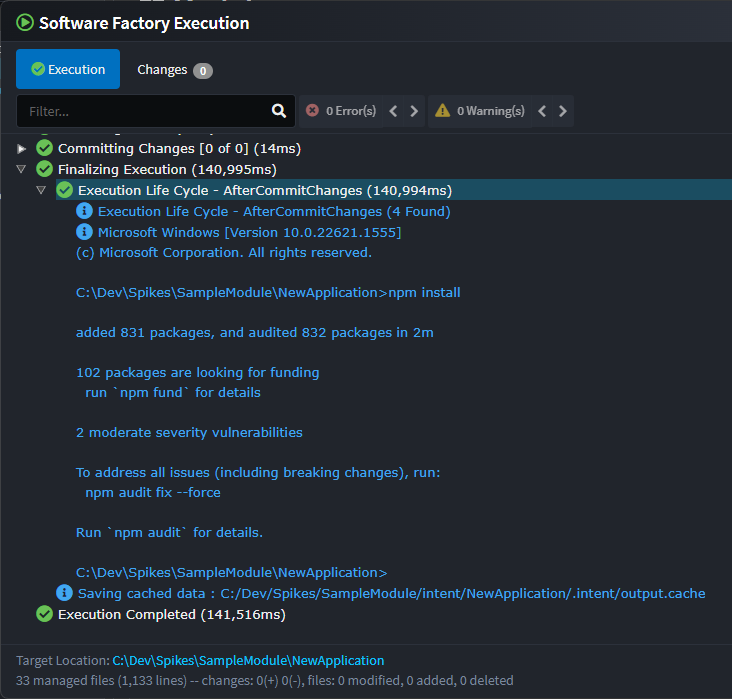
Run the Software Factory, click on the Apply button and then observe the following at the end of the process in the console output:
Advanced Template Manipulation
Working with C# File Builder Templates
The most common use case for Factory Extensions is manipulating templates that use the C# File Builder System:
protected override void OnAfterTemplateRegistrations(IApplication application)
{
    // Find all entity templates using role-based discovery
    var entityTemplates = application.FindTemplateInstances<ICSharpFileBuilderTemplate>("Domain.Entity");

    foreach (var template in entityTemplates)
    {
        // Use OnBuild to modify the generated code structure
        template.CSharpFile.OnBuild(file =>
        {
            var @class = file.Classes.FirstOrDefault();
            if (@class == null) return;

            // Add auditing interface
            if ([email protected](i => i.Contains("IAuditable")))
            {
                @class.AddInterface("IAuditable");
            }

            // Add auditing properties if they don't exist
            if ([email protected](p => p.Name == "CreatedAt"))
            {
                @class.AddProperty("DateTime", "CreatedAt");
                @class.AddProperty("string", "CreatedBy");
                @class.AddProperty("DateTime?", "UpdatedAt");
                @class.AddProperty("string", "UpdatedBy");
            }

            // Add auditing using directive
            file.AddUsing("System");
        });
    }
}
Working with Template Models
Factory Extensions can access and query template models without direct dependencies:
protected override void OnAfterTemplateRegistrations(IApplication application)
{
    var commandTemplates = application.FindTemplateInstances<ICSharpFileBuilderTemplate>("Application.Command");

    foreach (var template in commandTemplates)
    {
        // Try to get the model as a specific interface
        if (template.TryGetModel<IHasStereotypes>(out var stereotypedModel))
        {
            // Check for custom stereotypes
            if (stereotypedModel.HasStereotype("Cacheable"))
            {
                var cacheKey = stereotypedModel.GetStereotypeProperty<string>("Cacheable", "CacheKey");
                var expiration = stereotypedModel.GetStereotypeProperty<int>("Cacheable", "ExpirationMinutes");

                template.CSharpFile.OnBuild(file =>
                {
                    var @class = file.Classes.FirstOrDefault();
                    @class?.AddAttribute($"[Cacheable(\"{cacheKey}\", {expiration})]");
                });
            }
        }
    }
}
Cross-Module Coordination Patterns
Factory Extensions excel at coordinating activities across multiple templates and modules. Common coordination patterns include:
- Entity Framework Configuration Coordination - Automatically apply query filters, configure entity mappings, and set up audit properties based on entity stereotypes
- Service Registration Coordination - Collect services from multiple modules (repositories, application services, domain services) and register them in dependency injection containers
- MediatR Handler Registration - Automatically register command and query handlers with MediatR using assembly scanning
- API Configuration - Coordinate OpenAPI documentation, versioning, and security policies across controllers
- Database Migration Coordination - Generate migration scripts based on entity changes across multiple domain modules
- Event Bus Configuration - Register domain event handlers and configure distributed event publishing
- Authentication & Authorization - Apply security policies consistently across controllers based on model stereotypes
- Caching Strategy Coordination - Configure caching policies and cache invalidation across service layers
- Validation Pipeline Setup - Register FluentValidation validators and configure validation behaviors
- Logging and Monitoring - Apply structured logging and telemetry across all service layers
Advanced Patterns and Real-World Use Cases
1. Cross-Cutting Security Concerns
Add security attributes to all controllers based on model configuration:
protected override void OnAfterTemplateRegistrations(IApplication application)
{
    var controllerTemplates = application.FindTemplateInstances<ICSharpFileBuilderTemplate>("Application.Controller");

    foreach (var template in controllerTemplates)
    {
        if (template.TryGetModel<IHasStereotypes>(out var model))
        {
            template.CSharpFile.OnBuild(file =>
            {
                var @class = file.Classes.FirstOrDefault();
                if (@class == null) return;

                // Add authorization based on stereotypes
                if (model.HasStereotype("RequiresAuth"))
                {
                    @class.AddAttribute("[Authorize]");
                    file.AddUsing("Microsoft.AspNetCore.Authorization");
                }

                if (model.HasStereotype("AdminOnly"))
                {
                    @class.AddAttribute("[Authorize(Policy = \"AdminOnly\")]");
                }

                if (model.HasStereotype("RateLimit"))
                {
                    var limit = model.GetStereotypeProperty<int>("RateLimit", "RequestsPerMinute");
                    @class.AddAttribute($"[RateLimit({limit})]");
                }
            });
        }
    }
}
2. Automatic Validation Integration
Add FluentValidation support to all commands and queries:
protected override void OnAfterTemplateRegistrations(IApplication application)
{
    var commandTemplates = application.FindTemplateInstances<ICSharpFileBuilderTemplate>("Application.Command");
    var queryTemplates = application.FindTemplateInstances<ICSharpFileBuilderTemplate>("Application.Query");

    var validatorTemplates = new List<ICSharpFileBuilderTemplate>();

    foreach (var template in commandTemplates.Concat(queryTemplates))
    {
        if (template.TryGetModel<IHasName>(out var named))
        {
            // Create validator template for each command/query
            var validatorTemplate = CreateValidatorTemplate(named.Name, template);
            validatorTemplates.Add(validatorTemplate);

            // Add validation behavior to the original template
            template.CSharpFile.OnBuild(file =>
            {
                var @class = file.Classes.FirstOrDefault();
                @class?.AddAttribute("[ValidateRequest]");
            });
        }
    }

    // Register validators in DI
    RegisterValidators(application, validatorTemplates);
}
3. Distributed Events Integration
Automatically publish domain events from aggregate roots:
protected override void OnAfterTemplateRegistrations(IApplication application)
{
    var entityTemplates = application.FindTemplateInstances<ICSharpFileBuilderTemplate>("Domain.Entity")
        .Where(t => t.TryGetModel<IHasStereotypes>(out var model) &&
                   model.HasStereotype("AggregateRoot"));

    foreach (var template in entityTemplates)
    {
        template.CSharpFile.OnBuild(file =>
        {
            var @class = file.Classes.FirstOrDefault();
            if (@class == null) return;

            // Add domain events property
            @class.AddProperty("List<DomainEvent>", "_domainEvents", prop =>
            {
                prop.Private().WithInitialValue("new List<DomainEvent>()");
            });

            @class.AddProperty("IReadOnlyCollection<DomainEvent>", "DomainEvents", prop =>
            {
                prop.Getter.WithExpressionBody("_domainEvents.AsReadOnly()");
            });

            // Add methods for domain event handling
            @class.AddMethod("void", "AddDomainEvent", method =>
            {
                method.Protected()
                      .AddParameter("DomainEvent", "domainEvent");
                method.AddStatement("_domainEvents.Add(domainEvent);");
            });

            @class.AddMethod("void", "ClearDomainEvents", method =>
            {
                method.Protected();
                method.AddStatement("_domainEvents.Clear();");
            });

            file.AddUsing("System.Collections.Generic");
        });
    }
}
Integration with File Builder System
Complex Code Manipulation
Factory Extensions can perform sophisticated manipulations of the C# File Builder objects:
protected override void OnAfterTemplateRegistrations(IApplication application)
{
    var entityTemplates = application.FindTemplateInstances<ICSharpFileBuilderTemplate>("Domain.Entity");

    foreach (var template in entityTemplates)
    {
        AddValidationLogic(template);
        AddEqualsAndHashCode(template);
        AddToStringMethod(template);
    }
}

private void AddValidationLogic(ICSharpFileBuilderTemplate template)
{
    template.CSharpFile.OnBuild(file =>
    {
        var @class = file.Classes.FirstOrDefault();
        if (@class == null) return;

        // Add validation method
        @class.AddMethod("ValidationResult", "Validate", method =>
        {
            method.AddStatement("var result = new ValidationResult();");

            // Add validation for each property
            foreach (var property in @class.Properties.Where(p => p.HasGetter && p.HasSetter))
            {
                if (property.Type == "string")
                {
                    method.AddStatement($"if (string.IsNullOrWhiteSpace({property.Name}))");
                    method.AddStatement($"    result.AddError(\"{property.Name} is required\");");
                }
            }

            method.AddStatement("return result;");
        });
    });
}

private void AddEqualsAndHashCode(ICSharpFileBuilderTemplate template)
{
    template.CSharpFile.OnBuild(file =>
    {
        var @class = file.Classes.FirstOrDefault();
        if (@class == null) return;

        var keyProperties = @class.Properties.Where(p => p.Name.EndsWith("Id")).ToList();
        if (!keyProperties.Any()) return;

        // Add Equals method
        @class.AddMethod("bool", "Equals", method =>
        {
            method.Override();
            method.AddParameter("object", "obj");
            method.AddStatement($"return obj is {@class.Name} other && {string.Join(" && ", keyProperties.Select(p => $"{p.Name} == other.{p.Name}"))};");
        });

        // Add GetHashCode method
        @class.AddMethod("int", "GetHashCode", method =>
        {
            method.Override();
            var hashCode = string.Join(" ^ ", keyProperties.Select(p => $"{p.Name}.GetHashCode()"));
            method.AddStatement($"return {hashCode};");
        });
    });
}
External Process Integration
Running Build Tools After Generation
Execute external tools as part of the generation process:
protected override void OnAfterCommitChanges(IApplication application)
{
    // Run TypeScript compilation
    RunTypeScriptCompilation(application);

    // Generate OpenAPI documentation
    GenerateOpenApiDocs(application);

    // Run code formatting
    FormatGeneratedCode(application);
}

private void RunTypeScriptCompilation(IApplication application)
{
    try
    {
        var clientPath = Path.Combine(application.RootLocation, "ClientApp");
        if (!Directory.Exists(clientPath)) return;

        var process = new Process
        {
            StartInfo = new ProcessStartInfo
            {
                FileName = "npm",
                Arguments = "run build",
                WorkingDirectory = clientPath,
                RedirectStandardOutput = true,
                RedirectStandardError = true,
                UseShellExecute = false,
                CreateNoWindow = true
            }
        };

        process.Start();
        var output = process.StandardOutput.ReadToEnd();
        var error = process.StandardError.ReadToEnd();
        process.WaitForExit();

        if (process.ExitCode != 0)
        {
            Logging.Log.Warning($"TypeScript compilation warnings/errors: {error}");
        }
        else
        {
            Logging.Log.Info("TypeScript compilation completed successfully");
        }
    }
    catch (Exception ex)
    {
        Logging.Log.Warning($"Failed to run TypeScript compilation: {ex.Message}");
    }
}
Best Practices and Patterns
1. Order-Dependent Operations
Control execution sequence using the Order property:
public class SecurityExtension : FactoryExtensionBase
{
    public override int Order => -50; // Execute early for security setup
}

public class ValidationExtension : FactoryExtensionBase
{
    public override int Order => 0; // Default order
}

public class DocumentationExtension : FactoryExtensionBase
{
    public override int Order => 50; // Execute late for final documentation
}
2. Safe Template Access
Always verify template availability and types:
protected override void OnAfterTemplateRegistrations(IApplication application)
{
    var templates = application.FindTemplateInstances<ICSharpFileBuilderTemplate>("Domain.Entity");

    foreach (var template in templates)
    {
        // Verify the template is what we expect
        if (template?.CSharpFile?.Classes?.Any() != true)
        {
            Logging.Log.Warning($"Skipping invalid template: {template?.Id}");
            continue;
        }

        // Safe manipulation with error handling
        try
        {
            template.CSharpFile.OnBuild(file =>
            {
                var @class = file.Classes.FirstOrDefault();
                @class?.AddProperty("DateTime", "LastModified");
            });
        }
        catch (Exception ex)
        {
            Logging.Log.Error($"Failed to modify template {template.Id}: {ex.Message}");
        }
    }
}
3. Configuration-Driven Behavior
Use application settings to control Factory Extension behavior:
protected override void OnAfterTemplateRegistrations(IApplication application)
{
    var settings = application.Settings.GetMyModuleSettings();

    if (settings.EnableAuditing())
    {
        AddAuditingSupport(application);
    }

    if (settings.EnableCaching())
    {
        AddCachingSupport(application);
    }

    if (settings.EnableSecurity())
    {
        AddSecuritySupport(application);
    }
}
4. Conditional Template Manipulation
Only modify templates that meet specific criteria:
protected override void OnAfterTemplateRegistrations(IApplication application)
{
    var entityTemplates = application.FindTemplateInstances<ICSharpFileBuilderTemplate>("Domain.Entity");

    foreach (var template in entityTemplates)
    {
        // Only modify templates that have specific stereotypes
        if (!template.TryGetModel<IHasStereotypes>(out var model) ||
            !model.HasStereotype("Auditable"))
        {
            continue;
        }

        // Check if template already has auditing properties
        var hasAuditingAlready = false;
        template.CSharpFile.OnBuild(file =>
        {
            var @class = file.Classes.FirstOrDefault();
            hasAuditingAlready = @class?.Properties.Any(p => p.Name == "CreatedAt") == true;
        });

        if (!hasAuditingAlready)
        {
            AddAuditingProperties(template);
        }
    }
}
Error Handling and Debugging
Common Issues
- Templates Not Found: Ensure you're using the correct template IDs or roles and that templates are registered before your extension runs.
- Null Reference Exceptions: Always check for null values when accessing template properties and File Builder objects.
- Order Dependencies: Use the
Orderproperty to ensure your extension runs at the right time. - Template Model Access: Use
TryGetModel<T>()to safely access template models without causing exceptions.
Debugging Tips
- Review generated output: Always check the actual generated C# code to understand what your Factory Extension is producing.
- Use the debugger: You can debug your Factory Extensions and inspect the real-time state of templates and File Builder objects using the .NET Debugger.
- Log template discovery: Use
Logging.Log.Info()to track which templates are found and processed by your extension. - Verify execution order: Log entry and exit points of your extension methods to understand the execution flow.
Factory Extensions provide a powerful mechanism for implementing cross-cutting concerns and coordinating complex code generation scenarios. Use them strategically to build sophisticated, maintainable module ecosystems that work together seamlessly.