Intent.Metadata.DocumentDB
This module provides Domain Designer metadata and scripting support for Document DB-oriented modules.
Domain Designer Modeling
The Domain Designer has been extended with several stereotypes for modeling Document DB technology-specific concepts in your domain.
Document Database - Package Stereotype
The Document Database stereotype is applied to a Domain Package and configures it to use the Document DB modeling paradigm.
The stereotype may be applied automatically but can also be applied manually to Domain Packages if required.
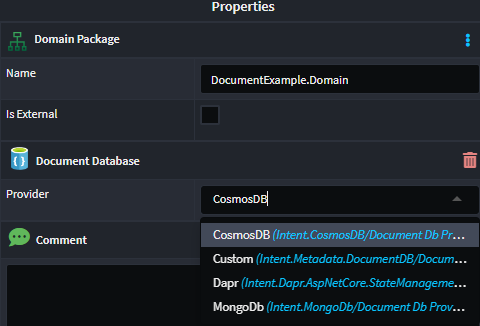
This stereotype includes a Provider property, which specifies which specific type of Document DB technology the Domain Package should be realized in. The available options in the drop-down are as follows:
- Default (None selected): If no provider is specified and you have a single Document DB provider module installed (e.g., Intent.CosmosDB), that module will be used by default.
- Custom: The backing implementation must be implemented through custom code.
- Dynamic installed module providers (e.g., CosmosDB, MongoDB, Dapr): Any Document DB provider-implementing modules will show as options here.
If you have multiple Document DB technologies, you must configure which Domain Packages are mapped to which Document DB technologies.
Primary Key - Attribute Stereotype
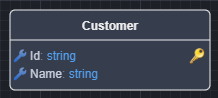
The Primary Key stereotype indicates that an Attribute is the document's primary key.
By default, any Class added to your domain will have an Attribute named Id with the Primary Key stereotype applied.
This stereotype is visualized with a golden key icon.
Primary Key Type
The default type for the Primary Key is Object ID (string). This can be changed using the Document Database > Id Type application setting.
The available options are:
- Object ID (string) - the default
- GUID

Primary Key Creation
The default behavior for Primary Key creation is that it will be applied to all entities (with the exception of child entities with one-to-one relationships).
This behavior can be modified using the Document Database > Key Creation Mode application setting.
The available options are:
- All - The default. All modeled entities, except for child entities with one-to-one relationships, will automatically be assigned a
Primary Key. - Only on Documents - Only parent entities (no child entities) will automatically be assigned a
Primary Key.
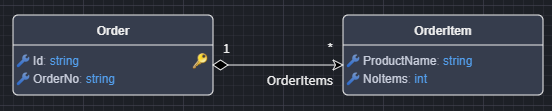
Visual example of an All modeled one-to-many relationship where the child entity (OrderItem) has a Primary Key:
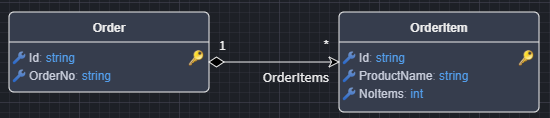
Visual example of an Only on Documents modeled one-to-many relationship where the child entity (OrderItem) does not have a Primary Key:
Note
The Create CRUD CQRS Operations accelerator in the Service Designer requires that an entity has a Primary Key (i.e., that the Key Creation Mode is set to All). If a child entity does not have a Primary Key, it will not be available for selection when using the Create CRUD CQRS Operations accelerator.
Foreign Key - Attribute Stereotype
The Foreign Key stereotype indicates that an Attribute has been introduced to a Class as a result of a modeled Association. For example:
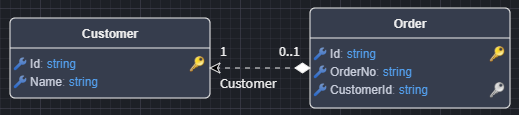
In this diagram, you can see that the CustomerId attribute has been introduced, with the Foreign Key stereotype, as a result of the many-to-one relationship between Basket and Customer.
In the Document DB paradigm, associations between different aggregate roots are denoted by dotted-line associations, as these are references between documents.
The Foreign Key stereotype is automatically managed when modeling associations. This stereotype is visualized with a silver key icon.
Compositional Relationship
This is the default relationship when modeling an Association and is represented by a black diamond on the source end of the relationship and a solid line between the two entities.
With this relationship, the child entity is considered a part of the parent entity and cannot exist without it.
In this example, an OrderItem has a Compositional Relationship with Order and cannot exist independently of an Order. It is considered part of the Order.

Aggregational Relationship
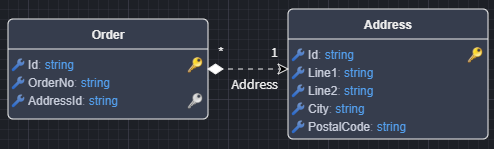
When the Source End of the Association has been set as Is Nullable, the relationship is considered an Aggregational Relationship. This is represented by a white diamond on the source end of the relationship and a dotted line between the two entities.
This relationship is modeled by setting the Is Nullable property of the Source End of the Association to true. In this case, the "child" entity can exist independently of the "parent" entity.
In this example, an Address has an Aggregational Relationship with Order and can exist independently of an Order.