Intent.AspNetCore.Controllers
This module realizes the ASP.Net core controller pattern based on Service modeling.
What are ASP.Net Core Controllers?
An ASP.NET Core controller is a class that serves as an intermediary between the HTTP client and the application logic. It is a lightweight, stateless component that handles HTTP requests and responses. This controller pattern is focused on Web API scenarios which returning data rather than HTML views. This type of controller provides essential functionalities such as routing, model binding, and response formatting. It is equipped with methods and attributes that facilitate handling of HTTP verbs (GET, POST, PUT, DELETE) and can return various result types like Ok, BadRequest, and NotFound. By inheriting from ControllerBase, developers can create RESTful services and APIs efficiently, leveraging built-in features for request processing, validation, and serialization.
To learn more check out the official documentation.
HTTP QUERY endpoints
Set an operation's Http Settings verb to QUERY to expose it with the HTTP QUERY method (RFC 10008): a safe, idempotent request that carries its criteria in the body, like a GET with a body.
ASP.NET Core has no attribute for QUERY, so the module generates an HttpQueryAttribute in the Controllers folder, and the action is decorated with [HttpQuery("...")]. The attribute is only generated when at least one operation uses QUERY. It uses HttpMethods.Query on .NET 10 and later, and the method name "QUERY" on earlier versions.
QUERY actions follow the same response rules as GET actions, including 200 OK for results and 404 Not Found for single results.
To show QUERY endpoints in the API documentation, install Intent.AspNetCore.Swashbuckle or Intent.AspNetCore.Scalar and target .NET 10.
Modeling Role / Policy based security
In the service designer you can now model your Roles and Policys and reference these on your end points.
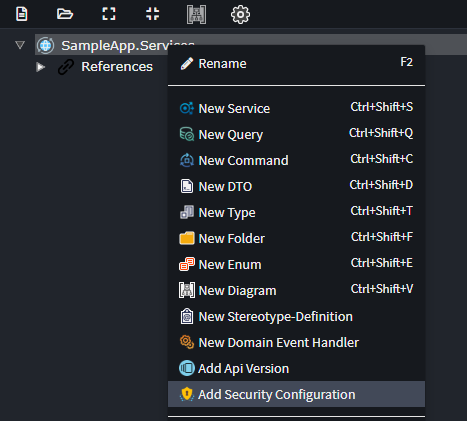
On the Service Package, Right Click and select Add Security Configuration.
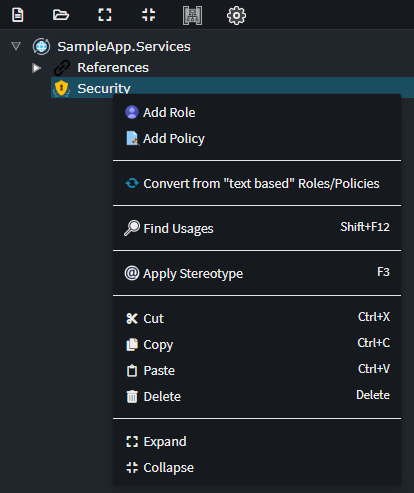
On the Security Configuration element, Right Click and select Add Role or Add Policy.
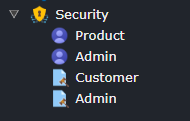
One you've configured your Roles and or Policys it will look as follows.
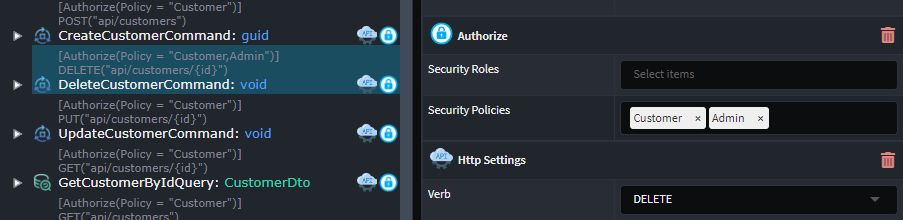
You can now configure these as your Roles / Policies on your Commands, Querys or Service Operations on the Authorize or Secured stereotypes.
Convert from our previous version of security
If you have already have your security configured on our older paradigm, you can upgrade to this new paradigm.
On the Service Package, Right Click and select Add Security Configuration.
On the Security Configuration element, Right Click and select Convert from 'text based' Roles/Policies.
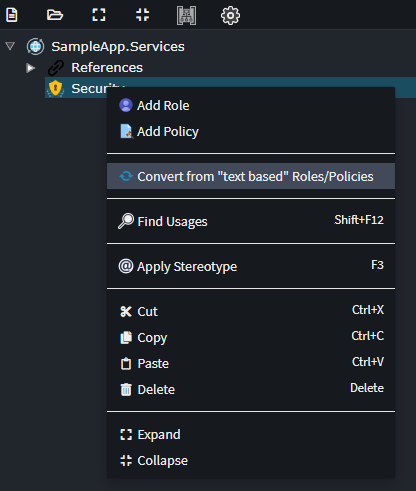
This will created Roles and Policys based on the current text configuration, write up you security stereotypes to point to these new Elements.
Note
If you are using + notation, this is not currently supported. Please reach out to us at https://github.com/IntentArchitect/Support should you need this support added."