Intent.AspNetCore.Identity.AccountController.Metadata
This module contains a metadata representation of the endpoints generated by the Intent.Modules.AspNetCore.Identity.AccountController module for use with service proxy designers, such as Web Client (from the Intent.Modelers.WebClient module) and Service Proxies (from the Intent.Modelers.ServiceProxies module).
The routes here are fixed at api
The Account service in this package declares its routes as literal values: api/[controller]/[action] for most operations, and ~/api/[controller]/... for forgotPassword, resetPassword and manage/info.
Those literals cannot track the Default API Route Prefix setting. The package is referenced read-only out of this module rather than copied into each consuming application — in a consuming .pkg.config it appears as isExternal="true" with a <module> element and no <path> — so a single shared copy of static XML serves every application, and there is no per-application copy a migration could rewrite.
From Intent.AspNetCore.Identity.AccountController 4.2.0 the generated controller does follow that setting. If you change the prefix away from api, the proxies generated from this package will call URLs the controller no longer serves, and you will need to correct the generated clients by hand. The Software Factory logs a warning naming this whenever the resolved prefix is not api. Applications left on the default api/ are unaffected.
Creating a service proxy using the metadata
Install the module
Install the module you would normally choose to generate service proxies, for example:
- For calls between microservices, the
Intent.Integration.HttpClientsmodule. - For calls from a Blazor web assembly application, the
Intent.Blazor.HttpClientsmodule. - For calls from an Angular application, the
Intent.Angular.ServiceProxiesmodule.
Choose the endpoints you wish to generate for
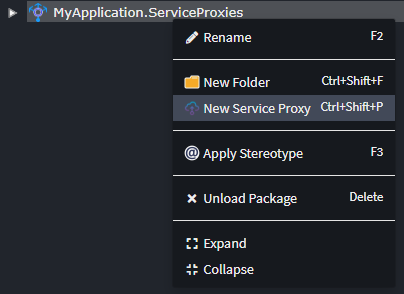
In a Service Proxies/Web Client designer, right-click the package or folder in which you wish to create the proxy and choose the New Service Proxy option:
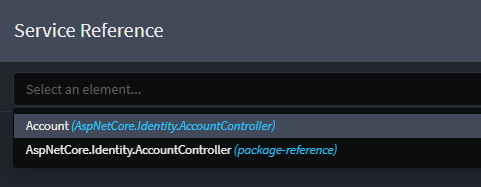
In the dropdown, select the Account (AspNetCore.Identity.AccountController) option:
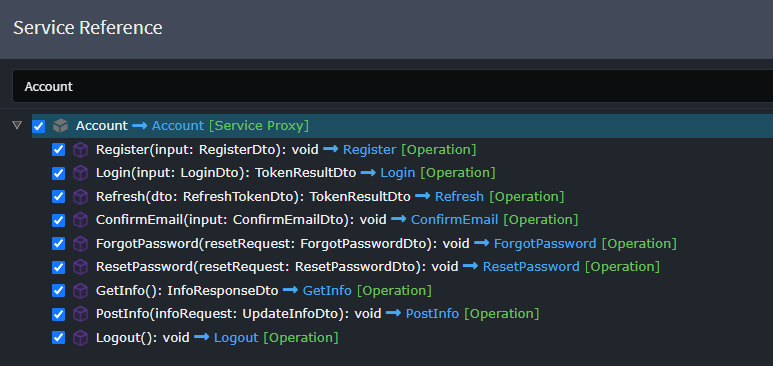
Select the operations for which you wish to create service proxies:
Click DONE.
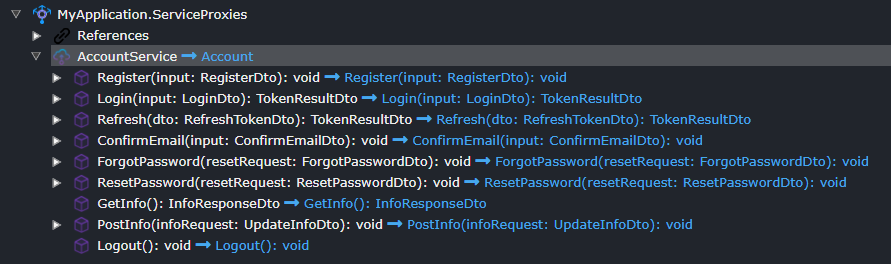
When you run the Software Factory, it will now generate the selected endpoints.
Configure the endpoint URL in your appsettings.json file
You will need to ensure the endpoint URL is correctly updated.
For Service Proxies, the relevant section is:
"HttpClients": {
  "AccountService": {
    "Uri": "https://localhost:{app_port}/",
    "IdentityClientKey": "default",
    "Timeout": "00:01:00"
  }
}
For Web Client for Blazor, the relevant section is:
"Urls": {
  "AspNetCoreIdentityAccountController": ""
}