Intent.Aws.Sqs
This module provides patterns for publishing messages to AWS SQS from any .NET application architecture. For message consumption, it currently supports AWS Lambda Functions through the related Intent.Aws.Lambda.Functions.Sqs module.
What is AWS SQS?
AWS SQS is a fully managed message queuing service that decouples and scales microservices, distributed systems, and serverless applications. It offers reliable, scalable, and cost-effective message delivery with features like message ordering, deduplication, visibility timeouts, and dead-letter queues.
For more information, see the official docs.
Why use AWS SQS?
AWS SQS integrates seamlessly with the AWS ecosystem, enabling easy inter-application communication through robust, asynchronous messaging. It ensures high availability and fault tolerance for reliable message delivery.
Modeling Integration Events and Commands
Modeling Integration Events can be achieved from within the Services designer.
This module automatically installs the Intent.Modelers.Eventing module which provides designer modeling capabilities for integration events and commands.
For details on modeling integration events and commands, refer to its README.
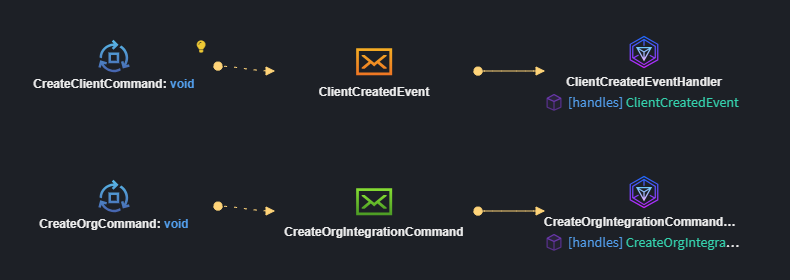
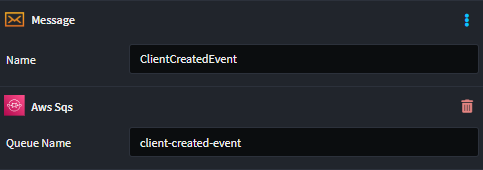
You can model Integration Events (orange Message envelope element), and it will automatically configure to work against an SQS Queue with a derived name.
However, you can customize the name of the Queue by applying an AWS SQS stereotype and setting the Queue Name to the desired name.
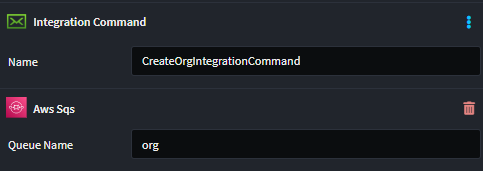
Similarly, you can model Integration Commands (green Message envelope element), and it will automatically configure to work against an SQS Queue with a derived name.
You can customize the name by applying an AWS SQS stereotype and setting the Queue Name to the desired name.
AWS SQS Implementation
Provides an AWS SQS specific implementation of the IEventBus interface for dispatching messages.
Message Publishing
Message publishing can be done through the IEventBus interface using the Publish method to send messages to SQS queues.
Message Consumption
For every message subscribed to in the Services Designer will receive its own Integration Event handler.
This is what the Business logic Integration Event handler looks like:
[IntentManaged(Mode.Merge, Signature = Mode.Fully)]
public class ClientCreatedIntegrationEventHandler : IIntegrationEventHandler<ClientCreatedEvent>
{
    [IntentManaged(Mode.Ignore)]
    public ClientCreatedIntegrationEventHandler()
    {
    }

    [IntentManaged(Mode.Fully, Body = Mode.Ignore)]
    public async Task HandleAsync(ClientCreatedEvent message, CancellationToken cancellationToken = default)
    {
        // Business logic here
        throw new NotImplementedException();
    }
}
Note
This module will not be generating consumer code automatically for you. Look at the Related Modules section to see which modules cause this to happen.
Working with Multiple Message Bus Providers
This module can coexist with other message bus implementations in the same application. When multiple providers are installed, Intent Architect automatically generates a Composite Message Bus that intelligently routes messages based on configuration.
Designating Messages for AWS SQS
When you have only this provider installed, all messages automatically use it—no configuration needed.
When you have multiple providers installed, you must designate which messages should be handled by AWS SQS using the Message Bus stereotype:
- Right-click on a Package or Folder in the Services designer
- Select Add Stereotype → Message Bus
- In the stereotype properties, select
AWS SQSfrom the Providers list
The stereotype can be applied at multiple levels:
- Package level: All messages in the package use the selected provider(s)
- Folder level: All messages in the folder inherit the designation
- Message level: Individual message-level control (rarely needed)
Stereotype Inheritance: Child elements inherit their parent's Message Bus stereotype automatically, so you typically only need to set it at the package or folder level. Intent handles all the routing transparently.
Generated Code Filtering
When multiple providers are installed:
- AWS SQS only generates handlers, consumers, and configuration for messages marked with its provider designation
- Messages designated for other providers are ignored by this module
- Messages can be marked for multiple providers and will be handled by each
Additional Resources
For comprehensive details on the Composite Message Bus architecture and design, see the Intent.Eventing.Contracts documentation.
Configuring SQS
When you're publishing using AWS SQS, you will need to configure it in your appsettings.json file.
AWS Configuration
{
  "AWS": {
    "Region": "us-east-1"
  },
  "AwsSqs": {
    "ClientCreated": {
      "QueueUrl": "https://sqs.us-east-1.amazonaws.com/123456789012/client-created"
    },
    "OrderPlaced": {
      "QueueUrl": "https://sqs.us-east-1.amazonaws.com/123456789012/order-placed"
    }
  }
}
LocalStack Support
For local development, set the following in your appsettings.Development.json:
{
  "AWS": {
    "ServiceURL": "http://localhost:4566",
    "Region": "us-east-1"
  }
}
The module automatically detects the ServiceURL setting and configures the SQS client accordingly for local development with LocalStack.
Message Attributes
The module automatically sets the MessageType attribute on published messages for routing and filtering purposes. This enables consumers to identify the message type without parsing the message body.
Related Modules
Intent.Aws.Lambda.Functions.Sqs
This module handles the consumer code for AWS SQS when AWS Lambda is selected as the hosting technology, allowing Lambda functions to process messages from SQS queues.
Note
Currently, this module only supports AWS Lambda Functions as the hosting technology through the Intent.Aws.Lambda.Functions.Sqs module. Support for other hosting technologies may be added in future releases. If you need support for a different hosting platform, please reach out to us on GitHub or email us at [email protected].