Intent.Entities.BasicAuditing
Basic auditing in database management is a pattern used to track key information about the creation and last modification of records. This involves adding fields to your SQL table such as CreatedBy, CreatedDate, UpdatedBy and UpdatedDate. This pattern offers a straightforward way to capture and display who initially created a record and who last modified it, along with the relevant timestamps. However, it is important to note that this approach provides a snapshot of the most recent actions rather than a comprehensive audit trail of all changes made over time.
Note
This is not an Audit Trail but merely a way to determine who touched an Entity and when.
General usage pattern
Select an Entity in the Domain Designer.
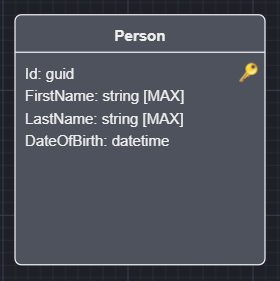
Right click and select Toggle Basic Auditing.
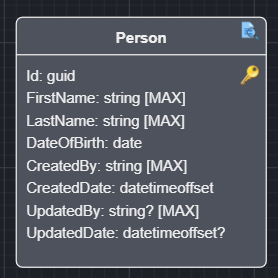
Your Entity will now be extended with the following attributes:
- CreatedBy - User Identity that created this Entity instance.
- CreatedDate - Timestamp when creation took place.
- UpdatedBy - User Identity that updated this Entity instance.
- UpdatedDate - Timestamp when creation took place.
Note
It is worth noting that the "updated" attributes remain null upon creation and only get populated when an update has taken place.
Automatically applying Basic Auditing
Rather than toggling the stereotype on each Class individually, you can have it applied automatically to every new entity via the Apply Basic Auditing to Entities application setting (see Basic Auditing Settings - Apply Basic Auditing to Entities below). When enabled, any Class you create from that point on will automatically get the Basic Auditing stereotype and its configured attributes - you no longer need to Right Click > Toggle Basic Auditing yourself.
Note
This only affects brand-new Classes going forward. It will not retroactively apply auditing to entities that already exist in your Domain Model - use Toggle Basic Auditing for those.
Application Settings which affect this module
This module uses the ICurrentUserService to determine the current user's identity.
public interface ICurrentUserService
{
    <UserID Type>? UserId { get; }
    string? UserName { get; }
    ...
}
Basic Auditing Settings - Apply Basic Auditing to Entities
Controls how the Basic Auditing stereotype (and its audit attributes) gets applied to entities, the options are:
- Manually (default), you apply auditing yourself per
ClassviaToggle Basic Auditing, as described in General usage pattern. - Automatically when created, every newly created
Classautomatically receives theBasic Auditingstereotype and its configured attributes, as described in Automatically applying Basic Auditing.
Basic Auditing Settings - User Identity to Audit
This setting allows you to select which field you would like to use as your audit of the user's identity, the options are:
- User Id (default), will use the
UserIdproperty and is typically more technical in nature. - User Name, will use the
UserNameproperty.
Basic Auditing Settings - Customizing the audit fields
Each of the 4 audit attributes can independently be included or excluded, and renamed, via the following application settings:
Include CreatedBy Field/CreatedBy Field Name(default: included, namedCreatedBy)Include CreatedDate Field/CreatedDate Field Name(default: included, namedCreatedDate)Include UpdatedBy Field/UpdatedBy Field Name(default: included, namedUpdatedBy)Include UpdatedDate Field/UpdatedDate Field Name(default: included, namedUpdatedDate)
An Include <Field> switch controls whether that attribute gets added to audited entities at all - disabling it removes the attribute (and any logic that populates it) entirely rather than merely hiding it. The corresponding <Field> Name setting is only used while its Include switch is enabled, and lets you rename the attribute to whatever suits your Domain Model's conventions (e.g. CreatedByUserId instead of CreatedBy).
Note
These settings apply application-wide to every entity that has Basic Auditing applied - they are not configured per-entity.
Identity Settings - UserId Type
This setting allows you to specify what the type of the UserId on the ICurrentUserService should be. Allowing you to customize how you want you audi data persisted.
- string (default)
- guid
- int
- long
The Audit fields of CreatedBy and UpdatedBy will respect the above settings.
Note
If you adjust the settings above - the UserId type, whether a field is included, or a field's name - after you have already modeled Classes with basic auditing, Right Click on any Audited class and select the Synchronize Auditing Identifiers option. This re-synchronizes every audited Class in your Domain Model (not just the one you clicked) so that their attributes match your currently configured types, inclusion and names. Audited entities that disagree on a field's name (because Synchronize Auditing Identifiers was not run everywhere after a rename) will cause a build-time error.
This introduces an IAuditable interface in your Domain project which gets added to class Entities that are decorated with the Basic Auditing stereotype.
public interface IAuditable
{
    void SetCreated(string createdBy, DateTimeOffset createdDate);
    void SetUpdated(string? updatedBy, DateTimeOffset? updatedDate);
}
Note
SetCreated and SetUpdated only declare parameters for the fields that are currently included - e.g. if Include CreatedBy Field is disabled, SetCreated only takes a createdDate parameter, and if both CreatedBy and CreatedDate are excluded, SetCreated is omitted from the interface entirely. The same applies to SetUpdated and its Updated* fields.
Example:
public class Person : IHasDomainEvent, IAuditable
{
    public Guid Id { get; set; }

    public string FirstName { get; set; }

    public string LastName { get; set; }

    public DateTime DateOfBirth { get; set; }

    public string CreatedBy { get; set; }

    public DateTimeOffset CreatedDate { get; set; }

    public string? UpdatedBy { get; set; }

    public DateTimeOffset? UpdatedDate { get; set; }

    void IAuditable.SetCreated(string createdBy, DateTimeOffset createdDate)
    {
        (CreatedBy, CreatedDate) = (createdBy, createdDate);
    }

    void IAuditable.SetUpdated(string? updatedBy, DateTimeOffset? updatedDate)
    {
        (UpdatedBy, UpdatedDate) = (updatedBy, updatedDate);
    }

    public List<DomainEvent> DomainEvents { get; set; } = new List<DomainEvent>();
}
Intent.EntityFrameworkCore integration
If you have the Intent.EntityFrameworkCore module installed, your DbContext will also be extended to automatically populate the Entities with the IAuditable interface using the injected ICurrentUserService to resolve the "current user" at the time.
public override async Task<int> SaveChangesAsync(
    bool acceptAllChangesOnSuccess,
    CancellationToken cancellationToken = default)
{
    await SetAuditableFieldsAsync();

    // ...
}
Intent.CosmosDB integration
If you have Intent.CosmosDB module installed, the CosmosDBRepositoryBase will be updated to set the auditable fields as appropriate.