Intent.Eventing.AzureQueueStorage
This module provides patterns for working with Azure Queue Storage directly.
What is Azure Queue Storage?
Azure Queue Storage is a cloud-based messaging service for storing large numbers of messages accessible via authenticated HTTP(S) calls. It enables asynchronous communication between application components, helping you decouple services and scale distributed systems effectively.
- Each message can be up to 64 KB in size.
- Queues can contain millions of messages.
- Ideal for message exchange between systems such as a web frontend and a background worker.
Azure Queue Storage supports durable message delivery, retry policies, and visibility timeouts - ensuring no message is lost during high load or transient failures.
Learn more in the official Azure documentation.
Modeling Integration Events and Commands
Integration Events and Commands are modeled in the Services Designer, via the Intent.Modelers.Eventing module, which is automatically included.
For details on modeling integration events and commands, refer to its README.

By default, the queue name is derived from the event or command name. To override this, apply the Azure Queue Storage stereotype and set a custom Queue Name.
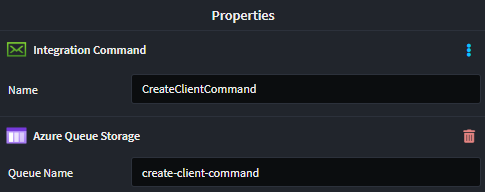
Azure Queue Storage Implementation
This module includes a Queue Storage-specific implementation of the IEventBus interface for dispatching events and commands.
Publishing Messages
Use the IEventBus interface:
Publish(...)for eventsSend(...)for commands
Consuming Messages
Each subscription modeled in the Services Designer generates an integration event handler like this:
[IntentManaged(Mode.Fully, Body = Mode.Merge)]
public class CreateClientCommandHandler : IIntegrationEventHandler<CreateClientCommand>
{
    [IntentManaged(Mode.Merge)]
    public CreateClientCommandHandler()
    {
    }

    [IntentManaged(Mode.Fully, Body = Mode.Merge)]
    public async Task HandleAsync(CreateClientCommand message, CancellationToken cancellationToken = default)
    {
        // TODO: Implement HandleAsync (CreateClientCommandHandler) functionality
        throw new NotImplementedException("Implement your handler logic here...");
    }
}
Working with Multiple Message Bus Providers
This module can coexist with other message bus implementations in the same application. When multiple providers are installed, Intent Architect automatically generates a Composite Message Bus that intelligently routes messages based on configuration.
Designating Messages for Azure Queue Storage
When you have only this provider installed, all messages automatically use it—no configuration needed.
When you have multiple providers installed, you must designate which messages should be handled by Azure Queue Storage using the Message Bus stereotype:
- Right-click on a Package or Folder in the Services designer
- Select Add Stereotype → Message Bus
- In the stereotype properties, select
Azure Queue Storagefrom the Providers list
The stereotype can be applied at multiple levels:
- Package level: All messages in the package use the selected provider(s)
- Folder level: All messages in the folder inherit the designation
- Message level: Individual message-level control (rarely needed)
Stereotype Inheritance: Child elements inherit their parent's Message Bus stereotype automatically, so you typically only need to set it at the package or folder level. Intent handles all the routing transparently.
Generated Code Filtering
When multiple providers are installed:
- Azure Queue Storage only generates handlers, consumers, and configuration for messages marked with its provider designation
- Messages designated for other providers are ignored by this module
- Messages can be marked for multiple providers and will be handled by each
Additional Resources
For comprehensive details on the Composite Message Bus architecture and design, see the Intent.Eventing.Contracts documentation.
Configuring Azure Queue Storage
The appsettings.json file controls how queues are configured and linked to event types. A default config is generated for local development, but can be customized for production environments.
Example Configuration
"QueueStorage": {
    "DefaultEndpoint": "UseDevelopmentStorage=true",
    "Queues": {
      "client-create-command": {
        "Endpoint": null,
        "CreateQueue": false
      },
      "create-organization-command": {
        "Endpoint": null,
        "CreateQueue": false
      }
    },
    "QueueTypeMap": {
      "Client.Api.Eventing.ClientCreatedCommand": "client-create-command",
      "Client.Api.Eventing.CreateOrganizationCommand": "create-organization-command"
    }
  }
Configuration Reference
| Name | Type | Description | Example |
|---|---|---|---|
DefaultEndpoint |
string |
The default connection string or endpoint for the Azure Queue Storage account. Used when a queue does not specify its own endpoint. | UseDevelopmentStorage=true |
Queues |
Dictionary<string, QueueDefinition> |
A dictionary of queue configurations, keyed by queue name. Each value defines properties such as whether to create the queue and a specific endpoint. | { "client-create-command": { "CreateQueue": false, "Endpoint": null } } |
Queues[queueName].Endpoint |
string (nullable) |
Optional custom endpoint for a specific queue. If null, the DefaultEndpoint is used. |
DefaultEndpointsProtocol=https;AccountName=... or null |
Queues[queueName].CreateQueue |
bool |
Whether the application should create the queue at startup if it doesn’t already exist. If false and the queue does not exist, and exception will be thrown |
true |
QueueTypeMap |
Dictionary<string, string> |
Maps a .NET message type name (e.g., a command or event class) to its corresponding queue name. This enables dynamic linking of messages to queue names. | { "Client.Api.Eventing.ClientCreatedCommand": "client-create-command" } |
Message Encoding
By default, messages are not encoded. This can be configured using the Azure Queue Storage application setting:
None(default)Base64
Important: All publishers and consumers must use the same encoding configuration, or message deserialization will fail.
Local Development
Azurite is a emulator which provides a local environment for testing of cloud-based application. Information on how to install and run can be found on the Azure website..
Microsoft Azure Storage Explorer can then be used to connect to and manage the local environment.
Related Modules
Intent.AzureFunctions.AzureQueueStorage
This module handles the consumer code for Azure Queue Storage when Azure Functions is selected as the hosting technology. Event subscriptions modeled when using an Azure Function will be realized as a QueueTrigger function:
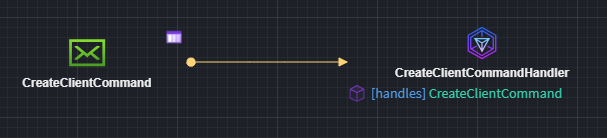
[Function("CreateClientCommandConsumer")]
public async Task Run(
    [QueueTrigger("create-client-command", Connection = "QueueStorage:DefaultEndpoint")] AzureQueueStorageEnvelope message,
    CancellationToken cancellationToken)
{
  // Function implication omitted
}
Intent.AspNetCore
This module introduces ASP.NET Core as the hosting platform for your application. When this is detected, a special background service is added to listen for inbound messages from Azure Service Queue.
Note
Not seeing the hosting technology you're looking for? Please reach out to us on GitHub or email us at [email protected], and we'll be happy to help.