Release notes: Intent Architect version 5.1
Version 5.1.3
Improvements in 5.1.3
- Improvement: ACP agents now show context window usage when available.
- Improvement: The "Ask Question" tool is now also exposed to ACP agents, enabling user-friendly presentation of questions in the AI chat area.
- Improvement: The MCP server now waits for module restoration to complete before returning from the
open_solutiontool. - Improvement: The MCP Server configuration screen now shows a "Fix" button when there is no
.mcp.jsonfile, or when it is not correctly configured for the running version of Intent Architect; it also adds a.gitignoreentry for the file, since Intent Architect installation paths are typically user- or machine-specific. - Improvement: A
.mcp.jsonfile is now created automatically when creating an application. - Improvement: A dialog now appears when a solution is opened without a correctly configured
.mcp.jsonfile and an option to fix or ignore it for the future. - Improvement: To reduce confusion in LLMs, designer scripting API basic mapping functions have been renamed with a
Basicprefix (setBasicMapping,isBasicMapped,getBasicMapping,clearBasicMapping); the previous names still work for backward compatibility.
Fixes in 5.1.3
- Fixed: A false "Generic type argument is required" validation error on the source end of associations declared on a generic element.
- Fixed: When creating solutions and applications via MCP tools, they would return before modules had finished downloading and installing; the tools now return only once everything is complete.
- Fixed: Using Ctrl + T for "Search Everywhere" wouldn't work from inside the AI Chat pane.
- Fixed: Leading new lines in the AI chat window would cause a misaligned overlap of text.
- Fixed: An exception would occur in the MCP server when multiple instances of Intent Architect had the exact same solution path opened.
- Fixed: "Handler already registered" errors could occur in designers.
- Fixed: Some ACP agents were incorrectly reported as available even when not actually installed.
Version 5.1.2
Released 2026-06-30.
Improvements in 5.1.2
- Improvement: Google Gemini is no longer restricted to read-only.
- Improvement: The list of available AI models is now provided by our server, so the catalog can be refreshed without an application update.
- Improvement: AI scripting API expanded further —
run_designer_scriptnow supports create/read/update/delete of stereotype definitions, adds agetThisElementsEnd()method on associations, hasgetSpecialization()report the association type, and includes association IDs and optional paths in its error reporting for clearer diagnostics. - Improvement: Additional script paths can now be included for scripts run by the
run_designer_scripttool. - Improvement: The
get_statusMCP tool now includes designer data, along with instructions for LLMs to check designer rules. - Improvement: An option to open Intent Architect's logs folder has been added to the user menu under a "Help" sub-menu.
- Improvement: Logs now include source context, making support diagnostics easier to trace.
- Improvement: AI tools for creating new solutions and applications.
- Improvement: The scripting API now supports adding and removing package references, and a new
list_available_package_referencesAI tool lets agents discover what's available. - Improvement: Large AI chat attachments are now classified (specification, log, tabular or generic) and presented accordingly, while preserving on-demand access to the full content.
- Improvement: The AI scripting API now provides file paths on demand rather than returning the full API up front, reducing token usage.
- Improvement: The Software Factory CLI now retries failed HTTP requests up to 5 times with progressively longer delays, making it more robust in hosted CI/CD environments where socket disconnections have been observed.
- Improvement: The Software Factory now logs the source of its line-ending configuration, to help investigate differences between environments.
Fixes in 5.1.2
- Fixed: A solution opened by launching Intent Architect with an
.islnpath argument was not added to the recent solutions list. - Fixed: For some kinds of errors from LLM provider endpoints, no error would be shown in the chat.
- Fixed: A null reference exception could occur when updating an application description via the MCP server.
- Fixed: Some validation was missing from the stereotype and property definition editors.
- Fixed: Modules Management tabs would sometimes appear transparent, showing the content of other tabs behind them.
- Fixed: "Open in IDE" / "View Code" items would sometimes not appear on context menus until at least one change had been applied in the Software Factory.
- Fixed: An exception could be thrown when an invalid
.gitdirectory was found.
Version 5.1.1
Released 2026-06-17.
Improvements in 5.1.1
- Improvement: Kiro is now a supported ACP agent — bring Amazon's Kiro agent into Intent Architect's AI chat alongside Claude Code, Codex and Copilot.
- Improvement: AI tool call inputs and outputs can now be opened in read-only editor tabs directly from the chat panel, making it easy to inspect what an AI agent sent or received without leaving Intent Architect.
- Improvement: AI chat attachments now survive conversation reloads — attachments are persisted with the conversation so that clicking a chip after reloading opens the file (text in a read-only editor tab, images and binaries in the OS default app).
- Improvement: Conversation compaction — conversations can now be manually compacted from the AI chat panel, trimming oversized tool results from the history view and reducing context consumption on long sessions, while retaining the full conversation data.
- Improvement: Auto-reload designer — when the underlying metadata files change on disk (e.g. after a
git pull), a designer that has no unsaved changes will now automatically reload. If there are unsaved changes, Intent Architect still prompts you. - Improvement: AI scripting API substantially expanded — many new and improved methods for
run_designer_script:getSpecialization(),getProperties()andgetName()on stereotypes;getId()on elements; improved type resolution including specialization filtering; package-level lookups; enhanced mapping capabilities andcreateAdvancedMappingfor associations; improvedlookupByPathresolution; better error messaging throughout. - Improvement: AI tools can now manage designer tab visibility — a new
bringToFrontoption pans visuals into view, and designer tabs can be loaded in the background without being activated. - Improvement:
get_statusMCP tool now treatsworkingDirectoryas optional and always reports all open solutions. - Improvement: Rules of AI tools are now exposed to ACP/MCP clients so agents can discover how to use each most effectively.
- Improvement: MCP module installation and uninstallation now routes through the same safe system used by the UI, so designer saves are prompted and Software Factories are shut down and restarted as needed.
- Improvement: Comments in stereotype and property editors now display only the summary (text before the first delimiter line), keeping the UI uncluttered when comments include extended detail.
- Improvement:
get_statusandget_applicationsMCP tools now also include application descriptions in their results.
Fixes in 5.1.1
- Fixed: The Asset Repositories dialog would duplicate application/solution context repositories after re-opening the dialog and pressing "Save and Close".
- Fixed: A
"repository path '<path>' is not owned by current user"Git error could occur in certain environments. - Fixed: Removals from
.csfiles in merge mode would not be picked up on Software Factory hot restarts. - Fixed: The currently selected file could become de-selected when hot-restarting the Software Factory.
- Fixed: Non-recursive glob patterns in the MCP
grep/globtools missed files in subdirectories. - Fixed: The terminal was not rendering certain glyphs properly (e.g. Claude Code's UI would not display correctly).
- Fixed: Visual Studio
.slnxsolution files were not included in the solution file list. - Fixed: The app could sometimes get stuck on the splash screen on launch.
- Fixed: The app would always not close correctly when using the updater's "Restart Now" button.
Version 5.1.0
Released 2026-06-09.
Hot on the heels of 5.0, version 5.1 turns its attention to the moment that matters most for an AI-native development platform: change. Where 5.0 brought AI into the heart of Intent Architect, 5.1 is about seeing, understanding, and controlling the changes flowing through your solution - from the model in your designers, to the code in your codebase, to the commits in your repository.
This release introduces first-class Git source control inside Intent Architect, a model-level change-tracking and diffing system that shows exactly what's changed in your designs (and against which baseline), a major expansion of supported AI providers including Claude Code, GitHub Copilot and Codex, and a new, more compact YAML / V3 metadata persistence format designed to make your on-disk metadata cleaner and your pull requests dramatically quieter.
As always, the team has also poured significant effort into polish, performance and the hundreds of small details that add up to a world-class experience.
We hope you love it. Thank you for your continued support and feedback - it directly shapes where we take the platform next. 🚀
Tip
Ready to get started? Head to our website and login to download it.
More AI providers, more ways to work
5.0 brought AI into the platform; 5.1 dramatically widens the set of AI providers and agents you can bring with you.
Use the agents you already love
Intent Architect now integrates leading agent CLIs directly via the Agent Client Protocol (ACP):
- Claude Code - chat and build against your own Anthropic subscription, with selectable models (including large-context options for big codebases) and reasoning-effort levels, using Claude Code's native permission system.
- OpenAI Codex - available as a first-class ACP agent.
- GitHub Copilot CLI - bring Copilot's agent into Intent Architect's chat.
Sign in with GitHub Copilot
You can now sign in with GitHub Copilot using a secure OAuth device flow - no API key required - and route requests through your existing Copilot subscription. A streamlined SSO re-authorization path means that when an organization session lapses, Intent Architect deep-links you straight to the right sign-in page instead of forcing a full re-login. Your token is stored encrypted and never directly exposed.
A redesigned AI configuration experience
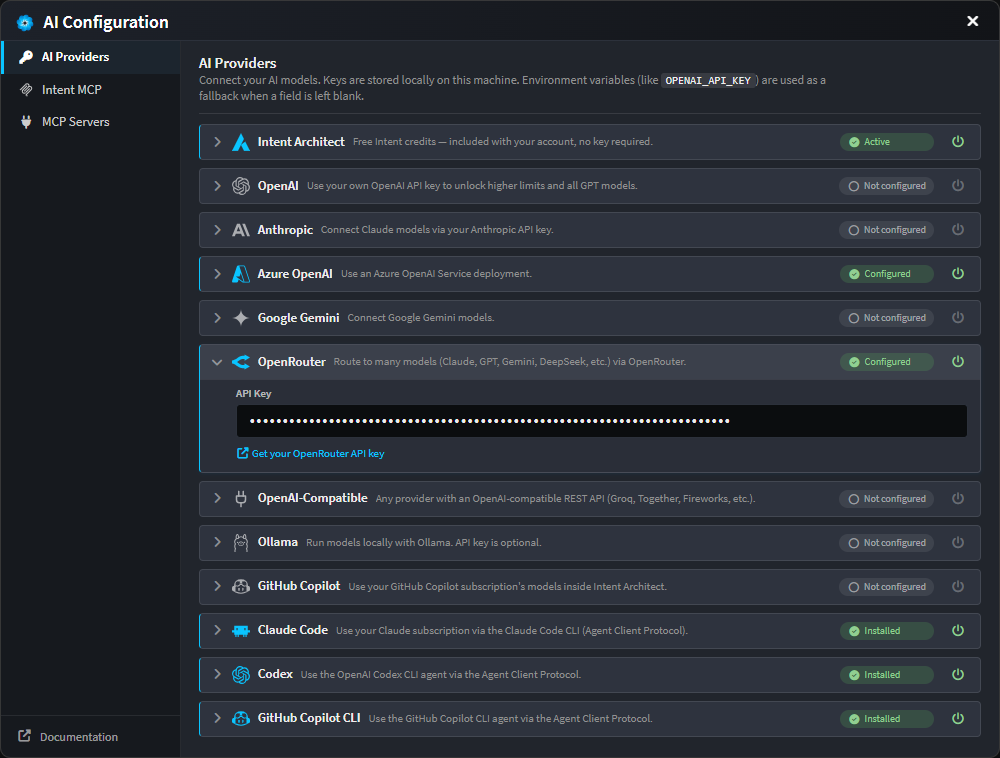
The AI Configuration dialog has been refreshed with a cleaner segmented layout and expandable provider cards. Each provider now shows a clear status (configured, unconfigured, unsaved edits, or disabled), and you can toggle any provider off without deleting its credentials. The provider list now spans Intent Architect, OpenAI, Anthropic, Azure OpenAI, Google Gemini, OpenRouter, OpenAI-compatible endpoints, Ollama, GitHub Copilot, and the Claude Code, Codex and Copilot CLI agents.
Pop the chat out, and watch your changes
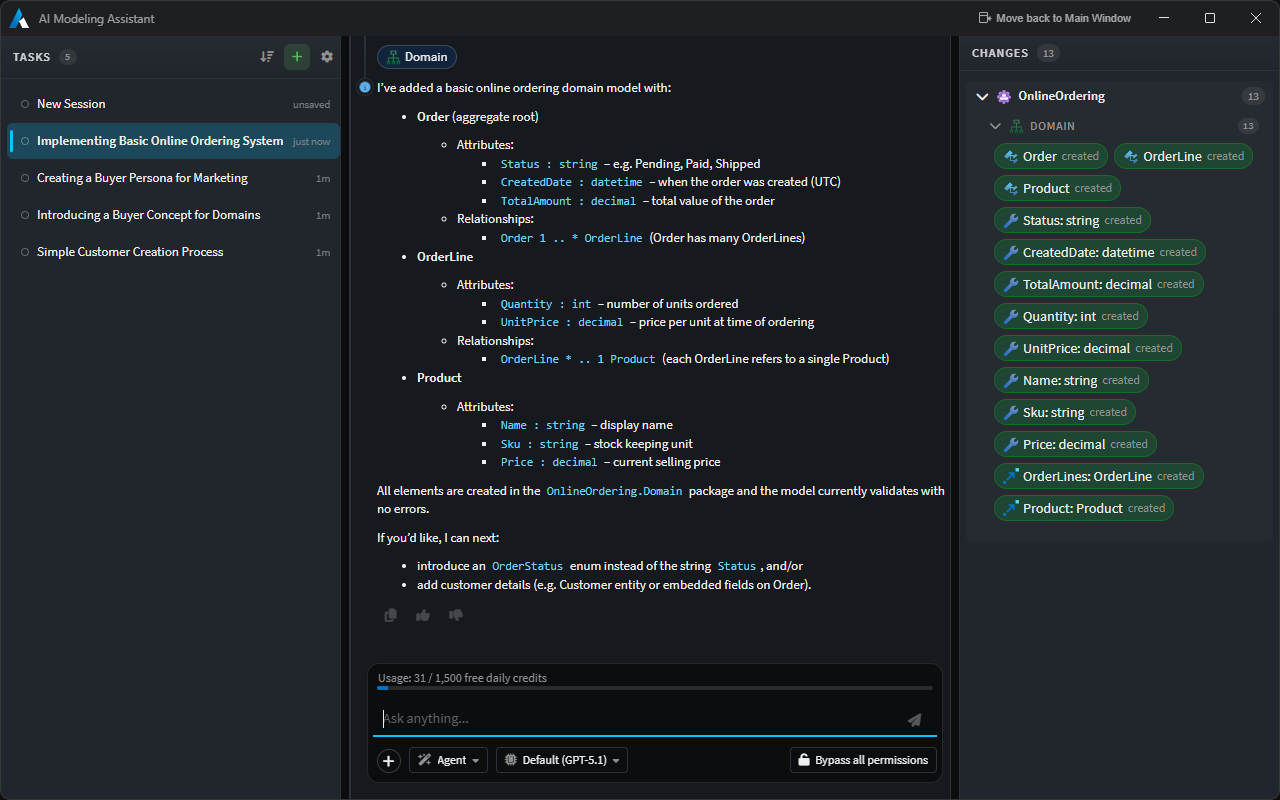
The AI Assistant chat can now be popped out into its own window - conversation state and all - which is ideal for multi-monitor setups. In the wider popped-out layout, a new Changes panel sits alongside the conversation, listing everything the current AI task has created or modified, grouped by application and designer, with clickable entries that navigate you straight to the affected element or file.
Sign in to MCP servers that need it
Intent Architect now supports OAuth 2.1 for remote MCP servers. When an HTTP MCP server requires authorization, a Sign in button appears in its entry - with full PKCE, dynamic client registration and automatic token refresh handled for you behind the scenes. MCP servers can also be scoped globally or per-solution, and to your modeling and/or coding agents.
Other AI improvements
- The AI Tasks panel gained sorting options (newest, oldest, or most recent activity) and is independently resizable.
- Stopping a chat now cleanly cancels any in-flight tool calls and pending approvals, freeing the conversation immediately and fixing a stop-then-send race.
- A canonical permission mode (ask before edits / edit automatically / bypass) is honoured consistently across providers from the first turn of a conversation.
- The model catalog and pricing data has been refreshed, and the model picker now shows a relative cost factor to help you choose.
MCP tooling improvements
5.1 significantly expands the breadth and reliability of the MCP tooling surface that external AI agents can use when connected to Intent Architect.
New tools
get_staged_file_diffs- Returns unified diffs of currently staged codebase files so that coding agents can reason about exactly what has changed without reading each file in full.get_application_settings/update_application_settings- Lets agents read and update application settings, including the new persistence format.get_designer_script_api- Describes the scripting API available in a given designer.run_designer_script- Executes a script inside a designer, enabling agents to perform bulk model manipulations programmatically.
Tool improvements
get_designer_schemanow produces a significantly more compact response: critical data is returned first, stereotype definitions have been split into a separateget_designer_stereotype_definitionscall, and overall token usage is substantially reduced. This was particularly important for agents such as Codex that enforce hard limits on response size.find_designer_elementsnow matches on property values as well as field names, making in-model searches more thorough.get_designer_diagram(diagram snapshots) now returns richer element metadata alongside the visual layout, giving agents more context per call.
Reliability and configuration
- Timeout prevention: Long-running MCP calls no longer time out due to a background-throttling issue in the MCP server host; throttling has been disabled so processing stays responsive.
- Software Factory errors surfaced to agents: When a Software Factory run triggered via an MCP tool call encounters an error, the failure is now propagated back through the tool response so the agent can diagnose and attempt to resolve the problem autonomously.
- MCP elicitation: The Intent Architect MCP server can now prompt the user for input mid-session using the MCP
elicitprotocol - for example, asking which solution to open when the agent hasn't specified one. - Configuration presets: New one-click presets for Kiro and Codex are available in the MCP Servers configuration tab; selecting one generates the correct MCP JSON snippet ready to paste into your agent's configuration file.
Git source control, built in
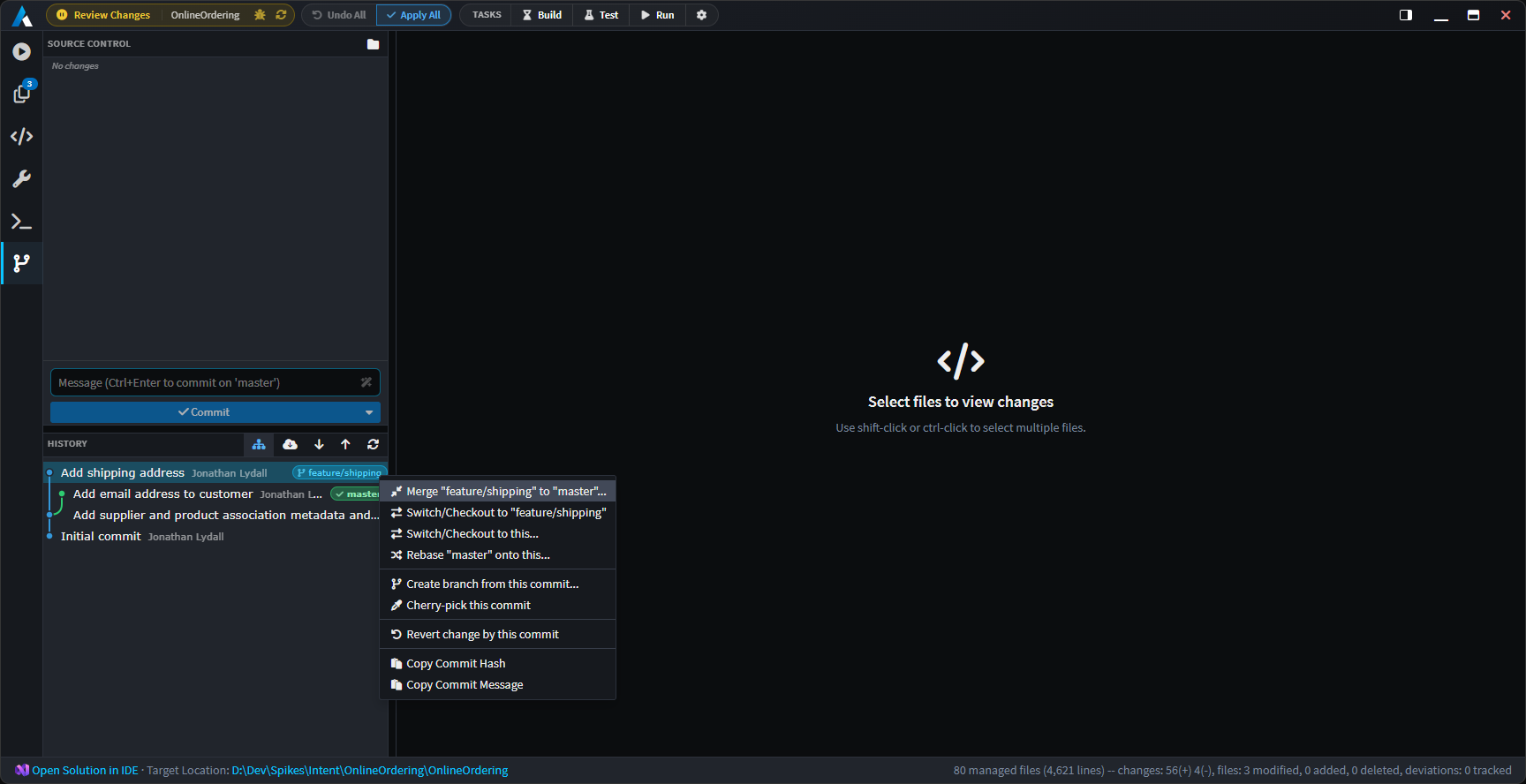
Intent Architect now ships with a complete Source Control experience, so you can manage your repository without leaving the platform. It lives as a new Source Control tab inside the Software Factory, sitting alongside Console, Changes, Codebase Explorer, Customizations and Terminal.
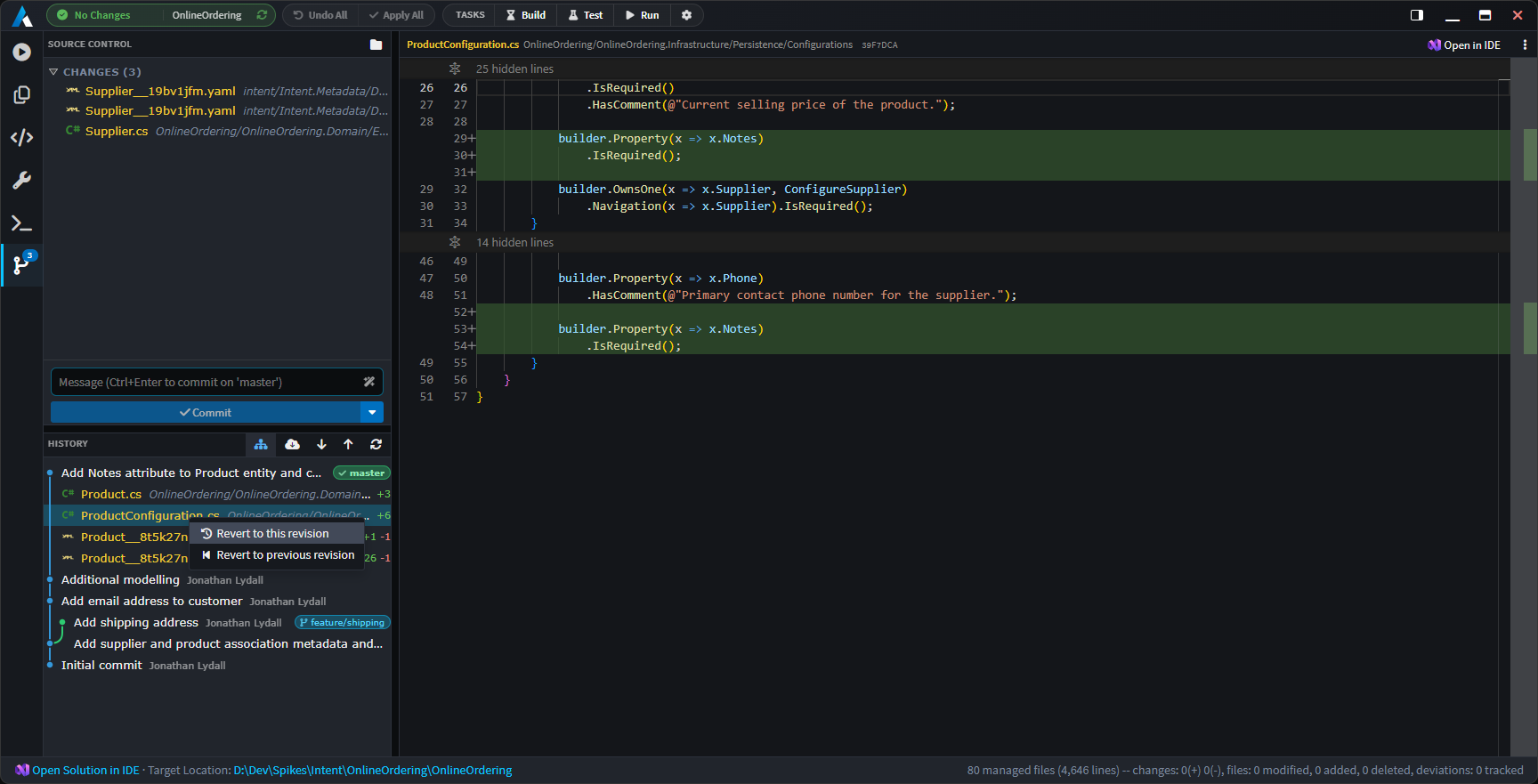
At a high level, you can now:
- See your changes at a glance - separate, independently-scrolling Working and Staged trees, each file annotated with icons and a colour-coded status (Added, Modified, Deleted, Renamed, Untracked, Conflicted). Toggle between a folder-grouped tree and a flat list, with your preference remembered per solution.
- Stage, unstage and discard files individually, in multi-selections, or in bulk (
Stage all,Unstage all,Discard all) - with a confirmation guard on discards. - Commit with a dedicated message box (
Ctrl+Enterto commit), with support for amending the previous commit. If nothing is staged, Intent Architect offers to stage-and-commit all working changes for you. - Generate a commit message with AI - click the magic-wand button and Intent Architect drafts a commit message from your pending diff and drops it into the input for you to review and tweak. It never commits on your behalf.
- Fetch, Pull and Push straight from the toolbar. These shell out to the
gitCLI, so your existing credential helpers, SSH agents and commit signing all keep working. - Initialize a repository with one click when your solution isn't in one yet.
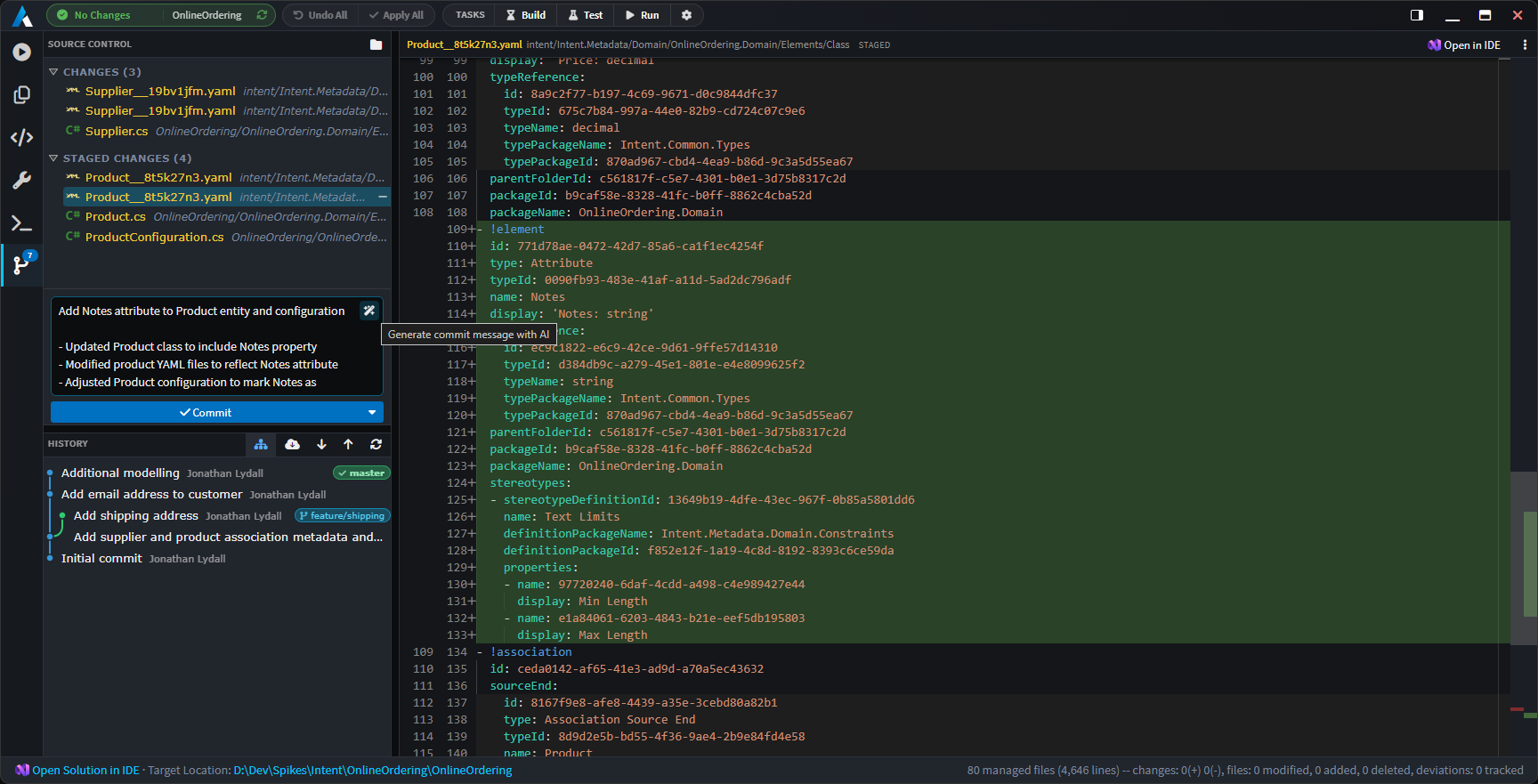
Visual history and commit context aware actions
The Source Control tab includes a visual commit graph with branch, HEAD and remote decorations, infinite-scroll paging, and an expandable per-commit file list. A Show all branches toggle switches between the current branch and the full graph.
Right-click any commit for a full set of actions: cherry-pick, revert, merge, switch/checkout, rebase, create branch at this commit, and copy the SHA or message. File rows offer revert to this (or the previous) revision. When a merge or rebase pauses for conflicts, a persistent inline bar guides you through Continue / Skip / Abort.
Always know where you are
The status bar at the bottom-right of the main window now shows your current repository and branch, refreshed automatically.
And because HEAD can move from anywhere - the terminal, an external IDE, another Git client - Intent Architect now watches your repository's HEAD and refreshes its change indicators automatically, so what you see is always in sync with reality.
Visual change tracking & comparison in the designers
One of the most requested capabilities is finally here: Intent Architect can now show you exactly what has changed in your model, right in the designer tree - and let you choose what to compare against.
The modified bar and model diff popover
Changed elements are now marked with a coloured bar in the tree gutter. Click it to open a model diff popover that lists the actual field-level changes as a tidy before → after table - renamed properties, retyped attributes, edited comments, added or removed stereotypes, changed mappings, and more. No more guessing why an element is flagged as dirty.
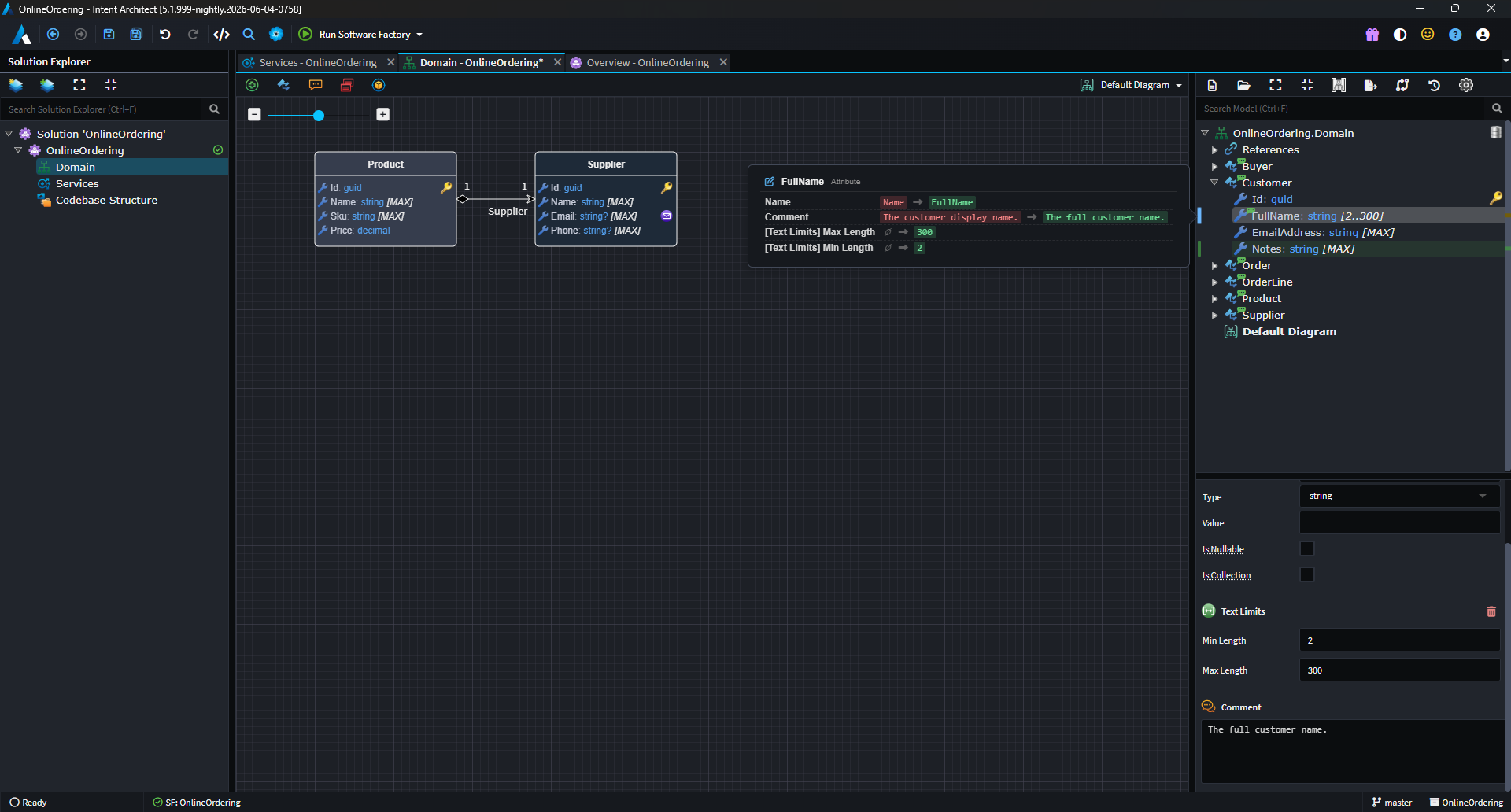
A diff overview ruler down the right edge of the tree (much like a code editor's minimap) gives you a bird's-eye view of where the changes are, and lets you click to jump straight to them.
Choose your baseline
A new diff baseline picker (the compare icon in the designer toolbar) lets you choose what "changed" means:
- Last save - highlights your unsaved changes (the classic behaviour). Clears when you save.
- Git HEAD - highlights your uncommitted changes by comparing your in-memory model against the last commit. Clears when you commit.

When your solution is in a Git repository, Intent Architect defaults to the Git HEAD baseline so you can see everything you've changed since your last commit at a glance - across saves and sessions. Your choice is remembered per solution.
Deletions you can see (and undo)
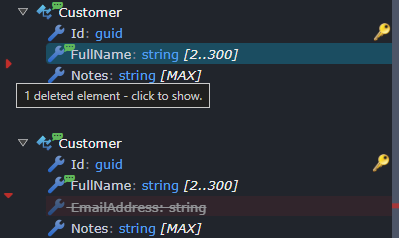
Deleted elements no longer simply vanish. They're now represented as ghost rows - faded, struck-through placeholders - tucked behind a small tombstone marker in the tree. Click the marker to reveal what was removed, and right-click a ghost to Restore it (whether it was deleted in this session or removed in a previous commit). Deletions also participate cleanly in undo/redo.
Changes on the diagram, too
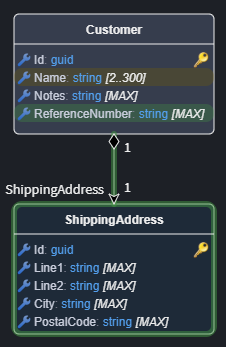
Diagrams now reflect change state with halo effects around visual elements - green for newly added, amber for modified - so you can spot what's new and what's changed without leaving the diagram surface.
Compare any two points in history
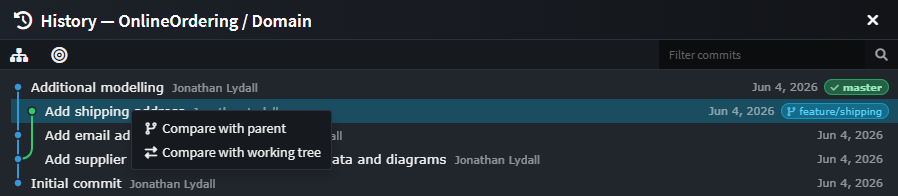
From a designer's toolbar, the new History… dialog opens a read-only commit browser scoped to your designer. Filter by message, author or SHA, toggle "touched this designer only", and then compare a commit against its parent, against your working tree, or two commits against each other. The result opens as a semantic model diff - the designer's own tree rendered with add/modify/delete badges - so you're comparing designs, not just file text.
A cleaner metadata format: YAML & V3 (opt-in)
Intent Architect 5.1 introduces a new, more compact way to store your solution's metadata on disk, available as an opt-in choice per application via the new Metadata Persistence Format dropdown in the application's Settings.
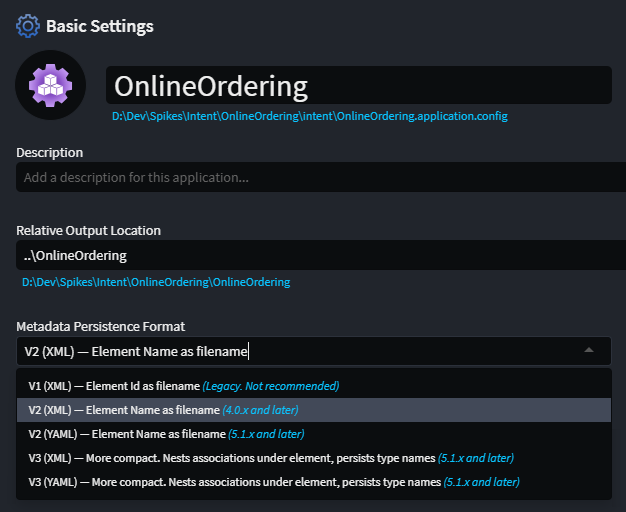
You can choose both a shape and a serializer:
- V3 consolidates each element and its associations into a single, position-ordered file, nests element-owned associations under their owning element (so they no longer sprawl across a separate
Associationsfolder), keeps human-readable type names inline, and omits redundant default values. The result is fewer files and far less diff noise. - YAML is now available as an alternative to XML for both the V2 and V3 shapes, for those who prefer a more readable on-disk format.
The headline benefit is cleaner, calmer source control: smaller files, fewer of them, associations that live with their element, and no incidental churn from default values - which means smaller pull requests and far fewer merge conflicts.
Switching format is straightforward. When you change the setting, Intent Architect offers to convert all existing metadata for the application in one go (recommended), or to let files migrate lazily as you edit them. Mixed-format folders load without issue, so migration is safe and incremental. Existing applications are completely untouched until you opt in, and the established XML format remains the default for new applications.
Important
Once an application adopts a 5.1 persistence format (V2 YAML, V3 XML or V3 YAML), its minimum client version is raised to 5.1.0. Make sure everyone on your team is on Intent Architect 5.1 or later before adopting a new format for a shared application.
Software Factory & Solution Explorer
Launch and monitor Software Factories from the Solution Explorer. Application (and folder) nodes now have a play affordance and live state icons, including staged-change indicators, so you can start a Software Factory and see its status without hunting for it.
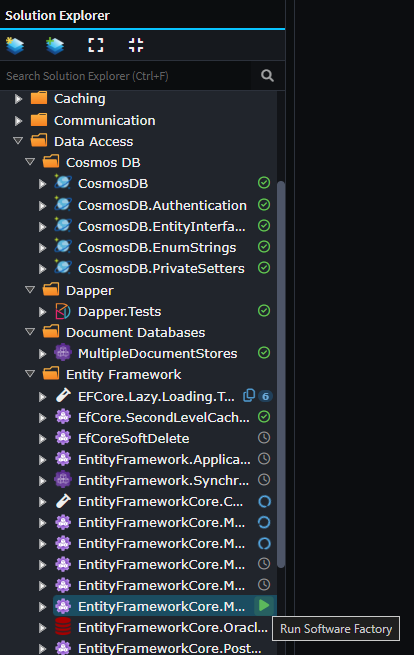
Concurrency control for Software Factory executions. A new limiter prevents too many Software Factories running at once, with a user-configurable maximum so you can tune it to your machine.
Clearer Software Factory errors. The "duplicate output location" error is now surfaced as a structured card with clickable element chips, copyable IDs, and an AI-assisted fix when both occurrences share a template. The "package reference" error is likewise surfaced as a structured card with clickable element chips and copyable IDs - no more raw stack traces.
Performance. The Software Factory now persists a cache for unchanged files to optimize its skip path, and caches formatted template output to speed up deviation comparison.
Inline code-management code lenses on diffs
Reviewing what the Software Factory wants to change just got a lot more powerful. When a pending change would overwrite code you've hand-edited, you no longer have to drop into your IDE and hand-write a code-management instruction to protect your work. Intent Architect now renders inline code-management lenses directly above each changed region in the Software Factory's diff view, so you can resolve the deviation right where you see it.
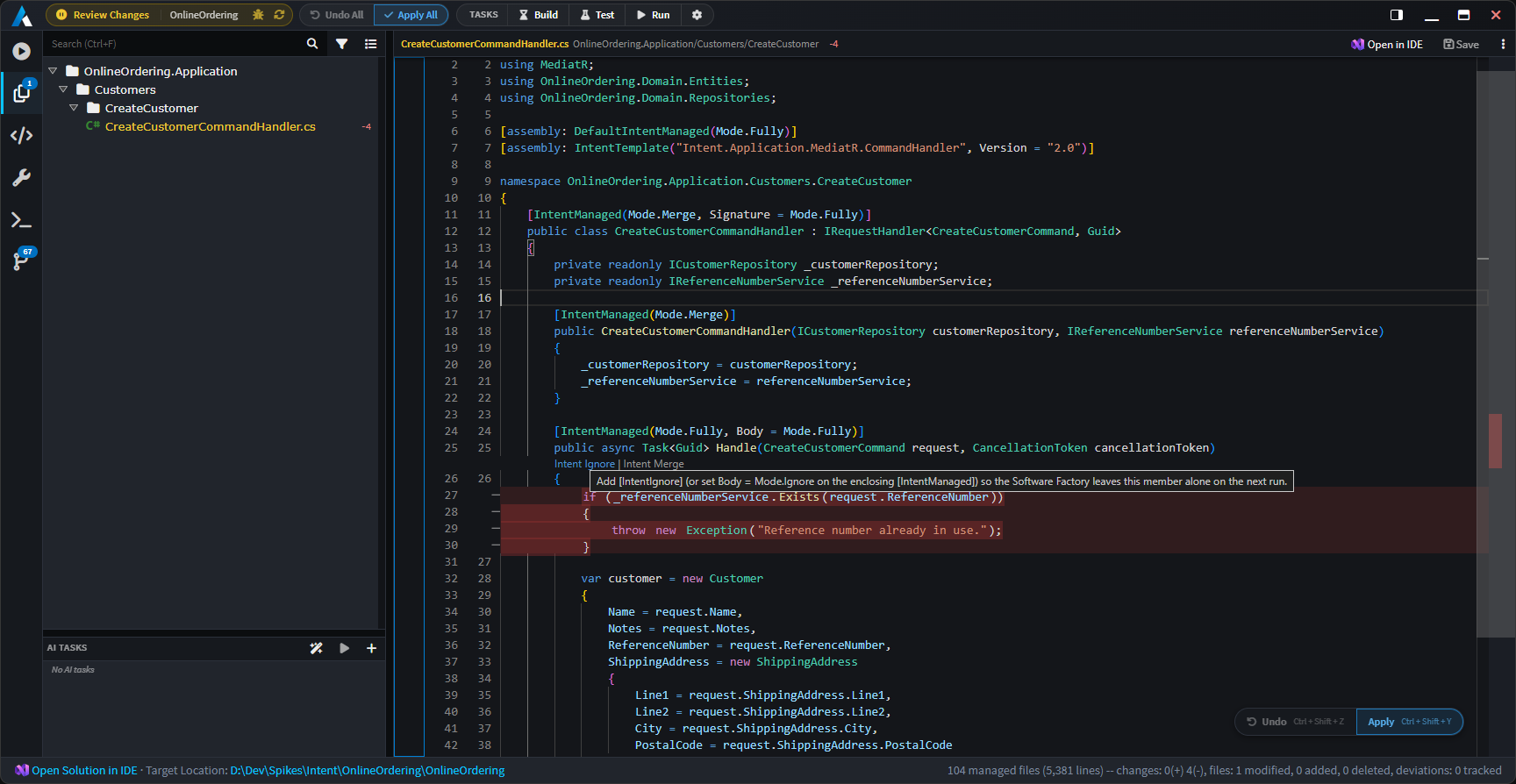
Two actions are offered per change hunk:
- Intent Ignore marks that region to be ignored by Intent's code management, so the Software Factory preserves your manual edit and won't try to overwrite it again - the per-hunk equivalent of tagging the code with an "ignore" instruction, without leaving the diff.
- Intent Merge switches the region to merge mode, so Intent keeps managing the surrounding structure while reconciling its generated output with your changes rather than replacing them wholesale.
Click a lens and Intent Architect applies the instruction to the code element covering that change, re-runs the diff, and confirms with a toast - the change you were about to lose simply drops off the pending list.
The lenses appear wherever a weaver exposes code-management actions for the file type (for example, .cs files when the Roslyn Weaver is installed), and hunks that only touch the code-management instructions themselves are skipped automatically. Prefer a cleaner diff? Toggle them off at any time via Code Management Lenses in the diff view's options menu - your preference is remembered.
Note
Requires version 4.11.0-pre.0 or higher of the Intent.OutputManager.RoslynWeaver module to be installed for lenses to show.
The Asset Repository screen, overhauled
The Asset Repository management screen has had a long-overdue overhaul:
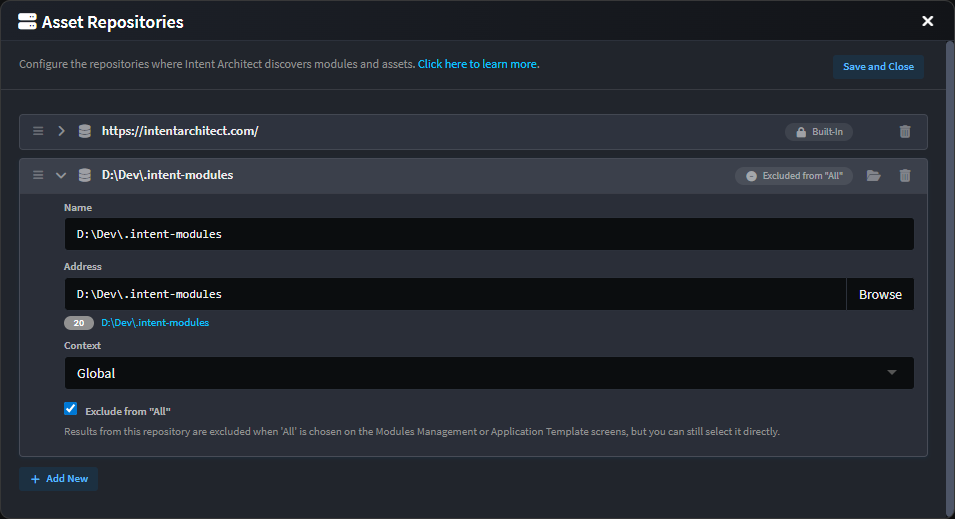
- Repositories can now be
Excluded from "All"- when checked, that repository's results are excluded when 'All' is chosen on the Modules Management or Application Template screens, while still being directly selectable. - Drag-and-drop reordering via handles on each entry.
- Entries are collapsed by default and expand on click so you can edit their details.
Improvements in 5.1.0
- Improvement: See the current Git repository and branch in the status bar, refreshed automatically.
- Improvement: Search Everywhere now finds in-memory (unsaved) elements, so newly added elements are discoverable before you save.
- Improvement: Module installation from the Template tab now supports minimum dependency versions.
- Improvement: Convert existing metadata when changing an application's persistence format (or during a rename).
- Improvement: Popped-out windows and modal dialogs now open on the same display as the main window, for a smoother multi-monitor experience.
- Improvement: Save and loading indicators added to tabs and diff views for clearer feedback during longer operations.
- Improvement: A flexible toolbar now gracefully handles overflow when space is tight.
- Improvement: Diff views support per-file editing and saving, inline vs side-by-side and word-wrap toggles (remembered across sessions), and reveal-in-explorer.
Fixes in 5.1.0
- Fixed: Software Factory performance degraded as the number of concurrent AI Tasks grew, due to unnecessary scroll requests.
- Fixed: Agent and MCP-server subprocesses could linger as orphaned processes after a conversation was deleted or the app shut down; they are now reliably torn down.
- Fixed: Cancelling an AI chat could break the conversation or leave in-flight tool calls unresolved.
- Fixed: AI conversation history could break under certain circumstances.
- Fixed: A conflict between Intent Architect's internal use of YamlDotNet and modules that also use it (for example the YAML weaver).
- Fixed: A null reference error could occur on a first install (for example in Windows Sandbox).
- Fixed: An XML serialization issue affecting the
output.cachefile. - Fixed: An asset repository excluded from "All" could still be used when selected indirectly.
- Fixed: The
run_software_factoryMCP tool would sometimes incorrectly report 0 changes.