AI Configuration
Open via the AI Configuration dialog in the AI chat window. There are four tabs.
1. AI Providers
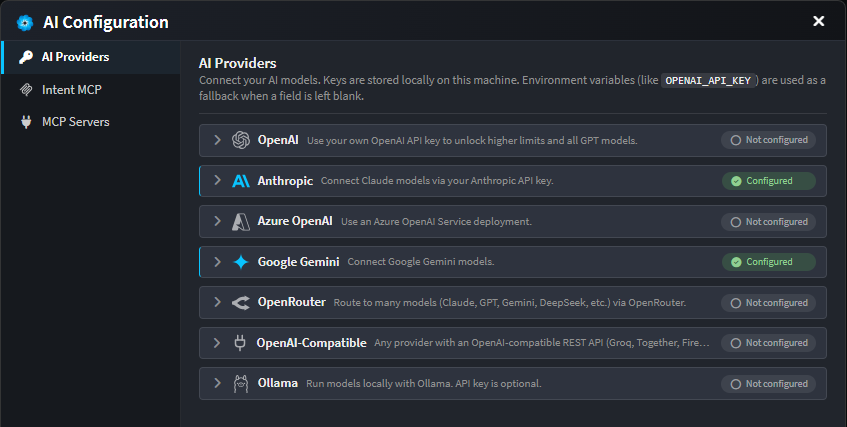
Connect Intent's agents to one or more LLM services. API keys are stored locally. If a key field is left blank, Intent falls back to the matching environment variable (e.g. OPENAI_API_KEY). Without any key, usage is capped by the free daily budget.
| Provider | What you need |
|---|---|
| Intent Architect | No setup required; includes free Intent credits |
| OpenAI | API key (sk-...) |
| Anthropic | API key (sk-ant-...); optional Max Output Tokens (blank = model default) |
| Azure OpenAI | API key, Endpoint URL (https://<your-resource>.openai.azure.com/), and Deployment Name of your Azure OpenAI model |
| Google Gemini | API key |
| OpenRouter | API key |
| OpenAI-Compatible | API key, Base URL of the API, and Model name (use this for providers like Groq, Together, Fireworks, etc.) |
| Ollama | Host URL (e.g. http://localhost:11434) and Model name; API key only if your host is behind an auth proxy |
| GitHub Copilot | GitHub Copilot subscription |
| Claude Code | Claude Code CLI (Agent Client Protocol) |
| Codex | OpenAI Codex CLI agent (Agent Client Protocol) |
| GitHub Copilot CLI | GitHub Copilot CLI agent (Agent Client Protocol) |
| Kiro | Kiro CLI agent (Agent Client Protocol) |
| Cursor CLI | Cursor CLI agent (Agent Client Protocol) |
| OpenCode | OpenCode CLI agent (Agent Client Protocol) |
Each provider shows a status pill: Not configured → Save Changes (after edits) → Configured. A CLI agent that can't be located on the machine shows Not installed, with a link to its installation guide. For step-by-step setup of the CLI agents, see CLI Agents as AI Providers.
Connector packages
The ACP connectors behind Claude Code, Codex and GitHub Copilot can be updated independently of an Intent Architect release. A Connector package field on each of those providers overrides the version used, and a connector download reports its progress in the chat.
2. Intent MCP
Intent Architect exposes its own MCP server, so external AI agents can drive Intent Architect's designers directly. Transport is stdio.
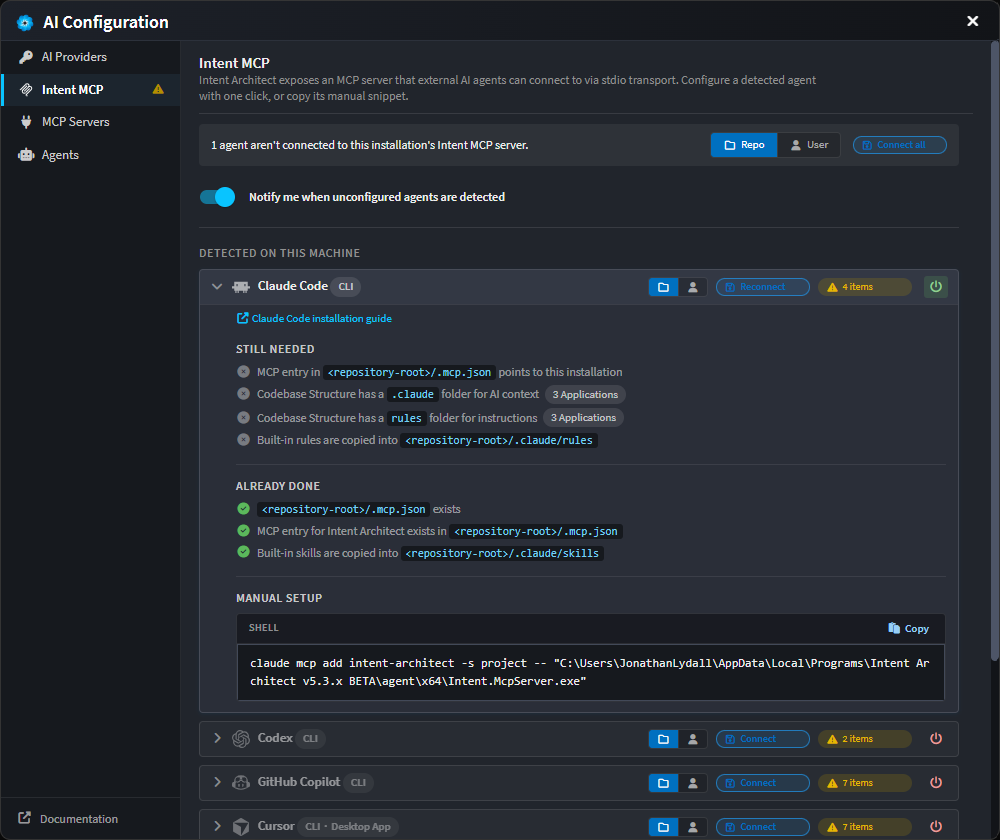
The tab lists one row per supported agent - Claude Code, Codex, GitHub Copilot CLI, Cursor, Kiro and OpenCode - grouped by whether the agent is detected on the machine. Each row shows a live Repo and User connection status and a one-click Connect, with Connect all available for the whole group.
Connecting does two things:
- Registers Intent Architect's MCP server in that agent's own configuration.
- Copies Intent Architect's built-in skills and rules into the agent's native folders -
.claude/skills,.cursor/rules,.kiro/steeringand so on - so the agent starts out equipped to work with the model.
Connecting creates any AI context folders that are missing, so no application is silently skipped. An agent that isn't detected on the machine can still be enabled and connected. The Advanced toggle reveals the raw executable path and arguments for assembling a configuration by hand.
For more details on what the Intent MCP server does and how external agents use it, see Intent MCP Server.
3. MCP Servers
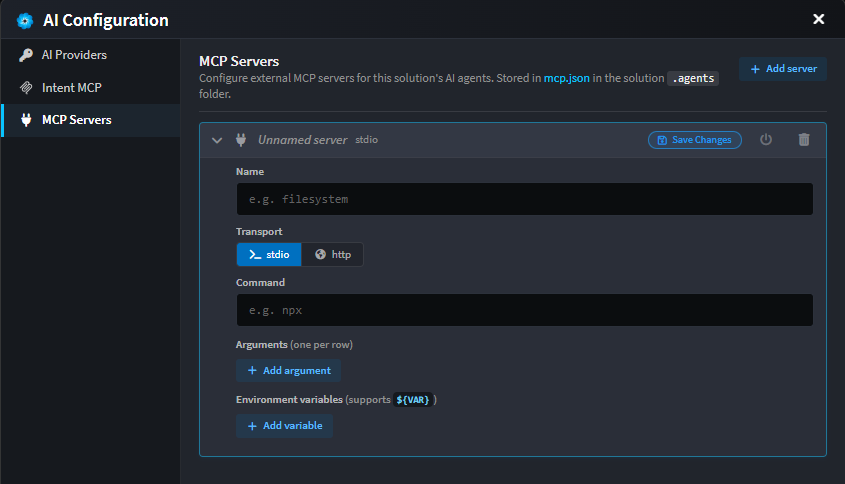
Connect external MCP servers to add extra tools for your AI. You can define servers globally (shared across all solutions) or per-solution (available only in that solution).
Global vs. Solution-specific servers
| Scope | Storage Location | Availability |
|---|---|---|
| Global | mcp.json under %AppData%/Intent Architect |
Shared across all your solutions |
| Solution | mcp.json in the solution's .agents folder |
Available only in this solution |
When both scopes define a server with the same name, the solution-level entry overrides the global one.
Configuring a server
For each server you can configure:
| Field | Notes |
|---|---|
| Name | Free-form label (e.g. filesystem) |
| Transport | stdio (launch a local command) or http (call a remote endpoint) |
| Command | (stdio) Executable to launch - e.g. npx |
| Arguments | (stdio) One per row |
| Env vars | (stdio) Key/value pairs; supports ${VAR} substitution from your environment |
| URL | (http) Endpoint URL |
| Headers | (http) Key/value pairs; supports ${VAR} substitution |
| Available in | Choose whether the server's tools are available to Modeling, Coding, or Both |
Each server has a status pill (Not tested, Testing…, Connected, Error, Disabled) and a power toggle to enable/disable it without deleting the entry. Disabled servers stay in the file but aren't loaded.
Edits are local until you click Save Changes on the entry.
4. Agents
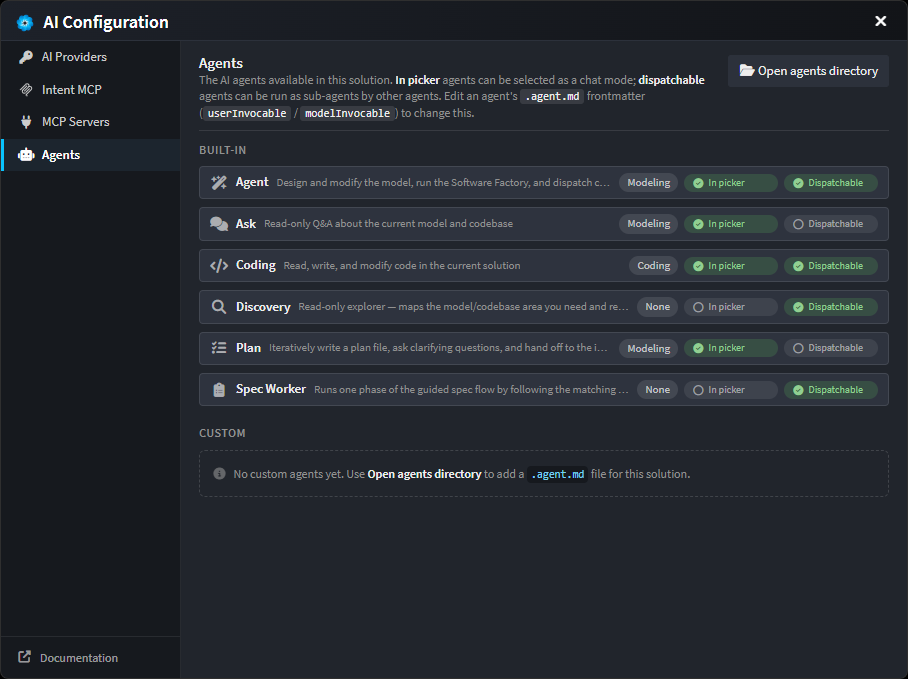
View all agents available in this solution, including built-in agents and any custom agents you've added. Each agent can be configured to appear in the chat mode picker and/or be runnable as a sub-agent by other agents.
Agent capabilities
Each agent has two availability modes, controlled via its .agent.md frontmatter (userInvocable / modelInvocable):
| Mode | Meaning |
|---|---|
| In picker | Agent appears as a selectable chat mode in the UI |
| Dispatchable | Agent can be invoked as a sub-agent by other agents |
For the full roster of agents that ship with Intent Architect, and what each one is for, see Built-in Agents.
Custom agents
To add a custom agent for this solution, click Open agents directory and create a new .agent.md file. For details on agent structure and how to write custom agents, see Custom Agents.