Intent.OpenApi.Importer
This module enhances the Service Designer allowing you to import / reverse engineer service models from OpenApi documents.
Service Designer
In the Service Designer, right click on your service package (or a folder in the package) and select the OpenApi Import context menu option.
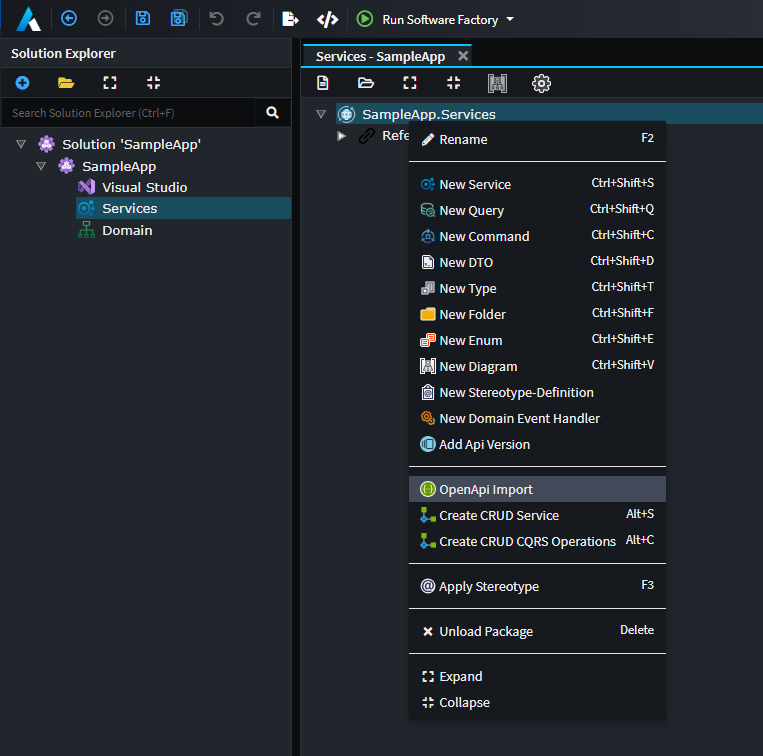
Selecting this option will provide you with the following dialog:
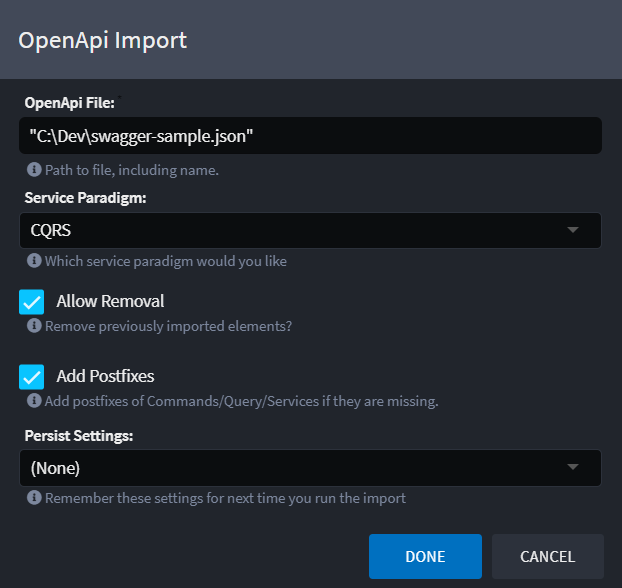
Dialog options
OpenApiFile
File path to the OpenApi document to import. This can be a path to the document stored locally (e.g. C:\Dev\swagger-sample.json) OR a URL to the document (e.g. https://petstore.swagger.io/v2/swagger.json)
Note
This document needs to be at least version 3.x, if you are working with an older version document you can potentially use tools like https://editor.swagger.io/ to upgrade older format files to the new standard.
The importer allows for " around the file name, these are not required. The Windows Copy as Path feature puts " around the file name so we support this for ease of use.
Service Paradigm
Select the paradigm you want the service modelled in:
- CQRS
- Traditional service
Allow Removal
The importer tracks what data it has imported, if this setting is enabled, the importer will remove any previously imported data.
Add Postfixes
If this option is on, it adds the relevant postfixes to your imported services, if they are not present. The postfixes are:
- Command
- Query
- Service
For example if you had a service end point named CreateCustomer and you select CQRS paradigm, the command will be named CreateCustomerCommand rather than simply CreateCustomer.
Persist Settings
The dialog can remember your configuration for the next time you want to run it. If you choose to persist the settings, they are saved in the Services Package which is committed in your source code repository.
(None), settings will not be persisted and remembered. Previously saved configuration will be deleted.All, All settings will be persisted.
OpenAPI Document URL
When importing an OpenAPI document, if it includes server URL information, the Service URL stereotype property will be automatically set on the package into which the document is imported. This Service URL is then used as the default base URL when creating service proxies (see importer usage below).
If the OpenAPI document does not define a server URL, or if the Service URL on the package is not set for any reason, you can manually configure it. In that case, the value you provide will be used as the initial default base URL for any proxies generated from the service.
Importer Usage
This article describes how to import and model a 3rd party service, and how it can be invoked from within your application.