Agent Context Loading
How Intent's AI agents discover the files that shape their behavior - agent definitions, instruction files, and skills - and where each type is loaded from at runtime.
Contexts: coding vs modeling
Behind the scenes, Intent's AI operates in two contexts that load different instruction files and skills:
modeling- works with Intent designers (Domain, Services, User Interface, etc.) and delegates to the coding context when implementation work is needed.coding- handles the Software Factory and works against an application's generated source code.
A modeling agent handles requests against the designers and delegates coding tasks to the coding context automatically, so implementation work is picked up without having to switch agents.
Each context has its own root folder for instruction files and skills: modeling-time files live alongside the solution, code-time files live alongside the generated code. An agent only loads the context files for its context - a modeling-context agent will never see files in the application's output folder, and vice versa.
See Custom Agents for how an agent declares which context(s) it operates in.
Folder Structure
Context files are organized by where they apply: instruction files and skills for modeling tasks live alongside your solution, while code-time files live in your application output folders. Everything below is automatic - drop the right files in the right places and they're picked up.
Modeling context files
Files that guide the AI when working with Intent designers (at ~/MySolution/intent/):
~/MySolution/intent/
└── .agents/
│   ├── AGENTS.md                       ← always loaded into the system prompt
│   ├── INTENT.md                       ← always loaded into the system prompt
│   ├── agents/
│   │   └── reviewer.agent.md           ← appears in the agent dropdown
│   ├── instructions/
│   │   ├── style-guide.md              ← always loaded (no frontmatter)
│   │   └── api-rules.md                ← only loaded when an attachment matches its `applyTo`
│   └── skills/
│       └── data-modeling/
│           └── SKILL.md                ← listed for on-demand loading
└── MySolution.isln                     ← the `.isln` file for the solution
Coding context files
Files that guide the AI when handling implementation work (in your application output folder at ~/MySolution/MyApp/):
~/MySolution/MyApp/
├── CLAUDE.md                           ← always loaded
├── AGENTS.md                           ← always loaded
├── .cursorrules                        ← always loaded
├── .github/
│   ├── copilot-instructions.md         ← always loaded
│   └── instructions/
│       └── *.instructions.md           ← always loaded (or scoped by `applyTo`)
├── .claude/
│   ├── rules/*.md                      ← always loaded (or scoped)
│   └── skills/<skill>/SKILL.md         ← listed for on-demand loading
├── .cursor/
│   └── rules/*.md, *.mdc               ← always loaded (or scoped)
└── .agents/
    ├── instructions/*.md               ← always loaded (or scoped)
    └── skills/<skill>/SKILL.md         ← listed for on-demand loading
These coding-side conventions match the dotfile layouts used by Claude Code, GitHub Copilot, Cursor, and Intent Architect - so existing repo-level guidance keeps working out of the box. Each supported agent uses its own context and instructions folder, matching that agent's real discovery convention, rather than several agents sharing one .agents folder.
CLAUDE.md and AGENTS.md are discovered by walking up from an application's output folder toward the repository root, so conventions defined at the root of a repository are picked up during coding turns.
1. Agent definitions (*.agent.md)
Agents can be customized by creating .agent.md files (YAML frontmatter + a system-prompt body) under {solutionFolder}/.agents/agents/. The agent's id is the filename minus .agent.md; drop a file with the same id as a built-in to override it for this solution only, or use a fresh id to add a new entry to the chat dropdown.
For the full file format, frontmatter reference, tool-selection guidance, and worked examples, see Custom Agents.
2. Instruction files
Plain markdown files (with optional YAML frontmatter) that get injected into every turn of the agent's system prompt under an <instructions> block.
Modeling context - under <solutionFolder>.agents/
| Path | Glob |
|---|---|
instructions/ |
*.md |
AGENTS.md |
(single file) |
INTENT.md |
(single file) |
Coding context - under the application's output folder
| Path | Glob |
|---|---|
.github/instructions/ |
*.instructions.md |
.claude/rules/ |
*.md |
.agents/instructions/ |
*.md |
.cursor/rules/ |
*.md and *.mdc |
CLAUDE.md |
(single file) |
.github/copilot-instructions.md |
(single file) |
.cursorrules |
(single file) |
AGENTS.md |
(single file) |
Optional frontmatter
---
description: One-line summary
alwaysApply: false
applyTo:
  - "**/*.cs"
  - "src/api/**"
---
| Field | Meaning |
|---|---|
description |
Human-readable summary |
alwaysApply |
If true, included regardless of patterns or attachments |
applyTo / appliesTo / globs / paths |
Glob list - only included when a chat attachment matches one of these |
Glob behavior:
**- any characters, including/*- any characters except/?- single character except/
Applicability rules, in order:
alwaysApply: true→ included.- No patterns set → included (frontmatter is optional).
- Patterns set → included only if at least one of the chat's attachments matches.
Files without frontmatter are always included. That's why
AGENTS.md,INTENT.md,CLAUDE.md, and similar are reliably picked up on every turn.
3. Skills
Skills are bundles of focused, reusable instructions invoked on demand - for example, "use the database-migration skill to plan this change." Each skill lives in its own folder containing a SKILL.md:
.agents/skills/
└── database-migration/
    ├── SKILL.md          ← required, with frontmatter
    └── …support files
SKILL.md frontmatter:
---
name: database-migration
description: Plan and execute a safe DB migration with rollback
---
The markdown body is the instruction content that gets loaded when the skill is activated.
When Intent Architect's own built-in skills and rules are missing from a chat's solution, a banner above the chat composer offers to add them. It can be dismissed for that folder, and they can still be applied later from the Intent MCP tab in AI Configuration.
Where skills are searched
| Context | Folders searched (first hit per skill name wins) |
|---|---|
modeling |
{solutionFolder}/.agents/skills/ |
coding |
{appOutputFolder}/.claude/skills/, .github/skills/, .agents/skills/ |
If the same skill name exists in multiple folders, the first one wins - so a skill in .claude/skills/foo/ shadows one in .agents/skills/foo/ for coding agents.
How a skill ends up in the prompt
There are three ways a skill becomes active for a turn:
Manifest only - every discovered skill is listed (name + description) in the system prompt, telling the agent it could request the skill.
use_skilltool call - the agent calls the always-availableuse_skilltool with the skill's name. The skill body (i.e. theSKILL.mdfile excluding its frontmatter) is loaded and included in the next turn.Slash command - if the user's chat message contains
/skill-name(matching a discovered skill), that skill is auto-loaded for the turn - no tool call needed.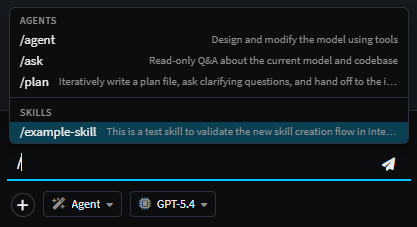
Summary
- Modeling agents delegate to the coding context automatically when implementation work is needed.
- Modeling context files live under
{solutionFolder}/.agents/- agent definitions, instructions, skills, and the always-loadedAGENTS.md/INTENT.md. - Coding context files live under each application's output folder, using the dotfile conventions of Claude Code, GitHub Copilot, Cursor, and Intent.
- Instructions without frontmatter are always loaded. Use
applyTopatterns when you want to scope an instruction file to particular file attachments. - Skills are opt-in. They're advertised in the prompt but only loaded when the agent explicitly requests them or the user invokes them with
/skill-name.